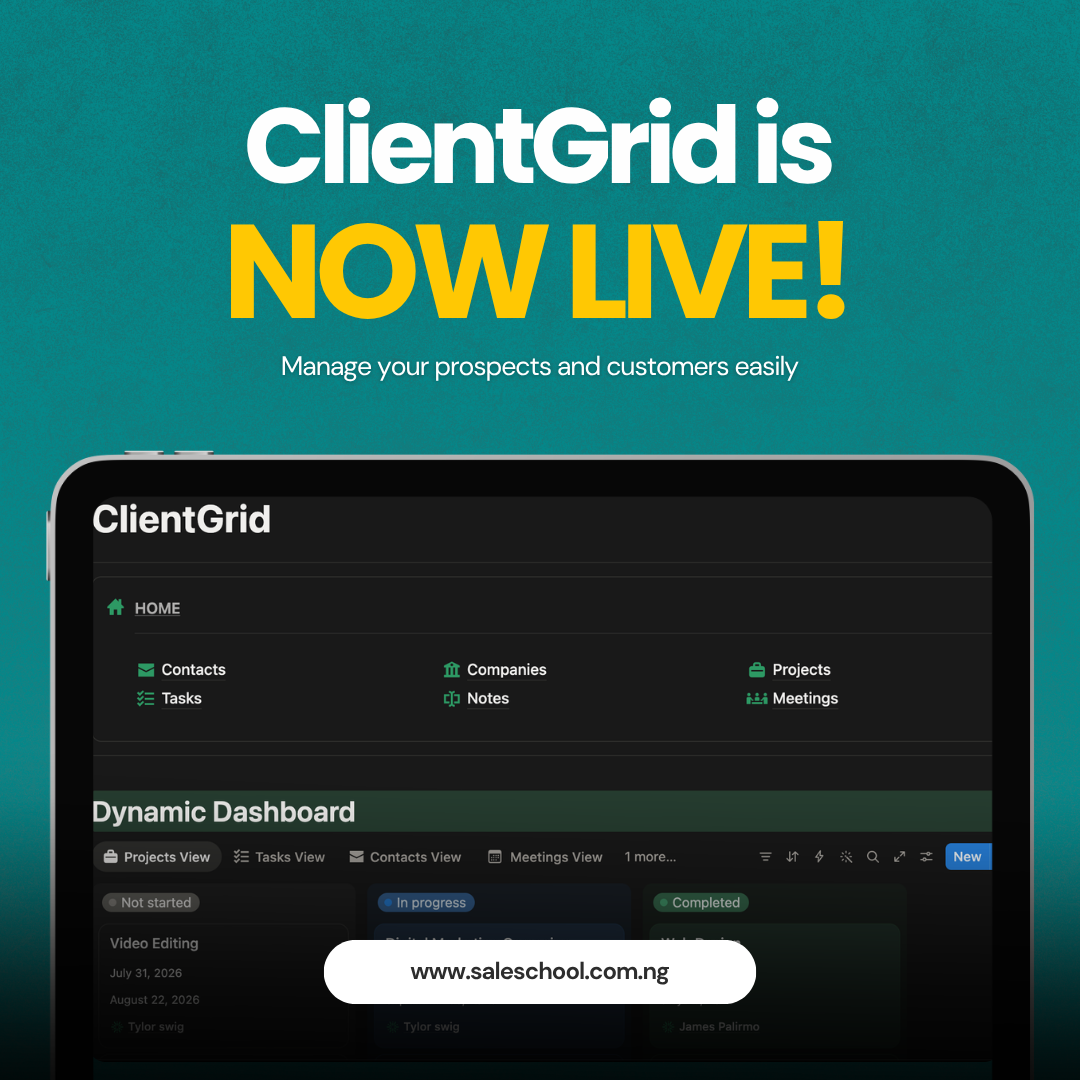
ClientGrid - CRM template to manage all your clients easily

Here is what managing clients without a system actually looks like:
It is the morning of a client call and you are scanning three different WhatsApp chats trying to remember what you agreed on last time.
It is the end of a busy week and you realize, with a small, cold feeling, that you never followed up with that prospect who said 'let me think about it.' That was eighteen days ago.
It is a potential client asking you 'what does your process look like?' and you describe it confidently, while privately knowing your process lives mostly in your head, your notes app, and your memory which is not a process at all.
It is getting a message from Emeka, a client you worked with six months ago, and spending four minutes searching through WhatsApp, Gmail, and a Google Doc to find what project you did for him, what he paid, and whether there were any issues.
It is what happens when a serious person runs a serious business without a serious system.
And here is the thing nobody says out loud:
The cost of this disorganization is invisible. You can't see the deals that went cold because follow-up was too slow. You can't measure the clients who chose someone else because their experience of you felt slightly scattered, even when your work was not. You can't count the referrals that didn't happen because a former client couldn't remember exactly what it was you did for them.
The invisible cost is always bigger than the visible one.
Consider what this costs you, not in theory, but in real numbers:
The Follow-Up Gap
Research on sales consistently shows that most deals require five or more follow-ups, and most salespeople stop after one. If you have no system tracking your follow-up dates, you are not making five touches. You are making one and hoping. Every lead you lose to a faster-moving competitor is a direct cost of not having this system.
The Disorganization Tax
Premium clients pay premium prices for professionals who make them feel safe. That sense of safety is communicated in how organized, prepared, and on top of things you appear to be. When you don't have a system when you're searching for emails mid-call, when you forget a client's last project, when you send a follow-up five weeks late you are paying a trust tax on every interaction. Clients who don't fully trust you do not refer you. They do not come back. They pay less.
The Attention Cost
Every client detail that lives in your head instead of a system is consuming a portion of your mental bandwidth right now, even as you read this. Your brain is spending energy tracking who you need to call, what you promised to send, which deal is still pending. That energy could be spent doing the actual work that grows your business.
The expensive CRM tools were not built for you. Salesforce was designed for American corporations with dedicated sales operations teams. HubSpot's useful features sit behind a pricing wall that makes no sense for a Nigerian freelancer. Most CRM software assumes your workflow, your market, and your currency, and it assumes none of them look like yours.
So you have been making do. Using what you have. Managing with WhatsApp and spreadsheets and goodwill and memory.
That ends today.
Saleschool was built because Nigerian freelancers and agency owners deserved better sales education and better sales tools built specifically for the way business is done in this market.
ClientGrid is that same philosophy applied to client management.
Introducing ClientGrid — The Notion CRM Built for African Professionals
ClientGrid is a complete, pre-built CRM workspace inside Notion. It gives you a clean, organized system to track every client, manage every deal, store every conversation, and follow up on every opportunity without a monthly subscription, without complexity, and without the learning curve of an enterprise tool you'll abandon by week three.
It is not a watered-down version of Salesforce. It is not a basic template you'll outgrow in sixty days. It is a thoughtfully built client management system designed around how Nigerian freelancers, agency owners, and B2B founders actually work.
Here is exactly what you get:
1. Dynamic Dashboard
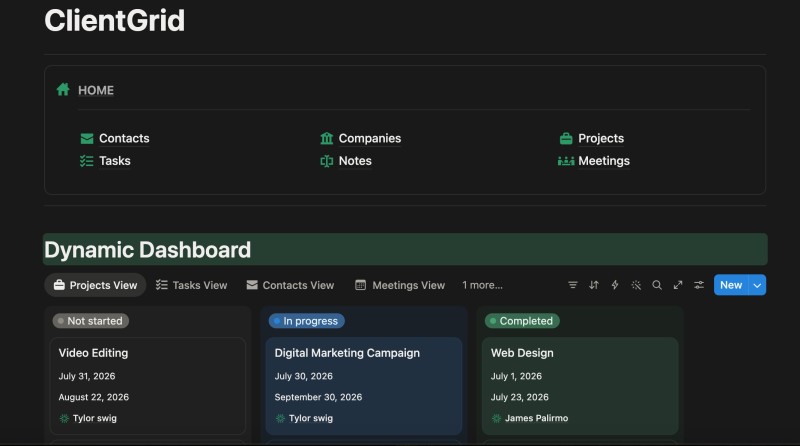
The moment you open ClientGrid, you see everything. Projects sorted by status — what has not started, what is in progress, what is done. Your full contact list. Your upcoming meetings. Your recent notes. All in one screen.
So what does that mean for you?
It means your morning starts with clarity instead of confusion. Instead of opening four different apps to understand where your business stands today, you open one view and you know.
2. Sales Pipeline
A gallery view of every deal in your pipeline, with each contact shown as a card. Stage, status, and owner visible at a glance. Move a card from New to Qualified to Proposal Sent to Closed in one click.
So what does that mean for you?
It means you stop losing deals to forgetfulness. Right now, if someone asked you how many active leads you have and exactly where each one stands, could you answer in under thirty seconds without checking your phone? With ClientGrid, the answer is always yes.
3. Contacts Management
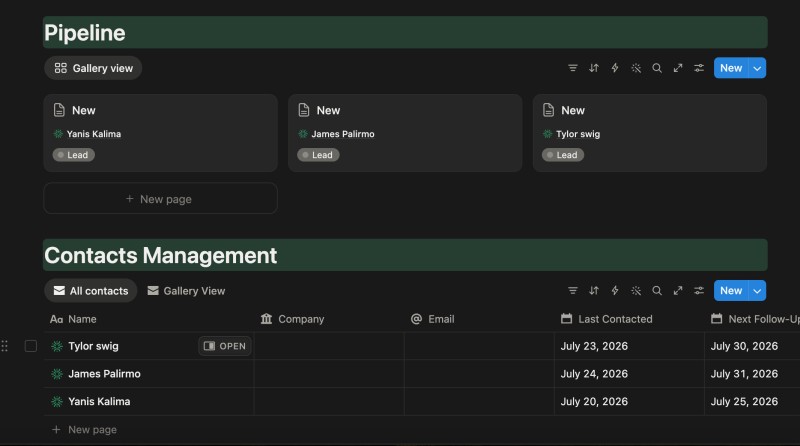
A full database of every client and prospect. Name, company, email, phone number, last contacted date, next follow-up date, and a notes column — all in one table. Two views: a full table and a gallery of visual contact cards.
So what does that mean for you?
It means you never walk into a call unprepared. You never forget when you last spoke to someone. And you never miss a follow-up because you have a system that tells you exactly who needs your attention today.
4. Project Mastermind
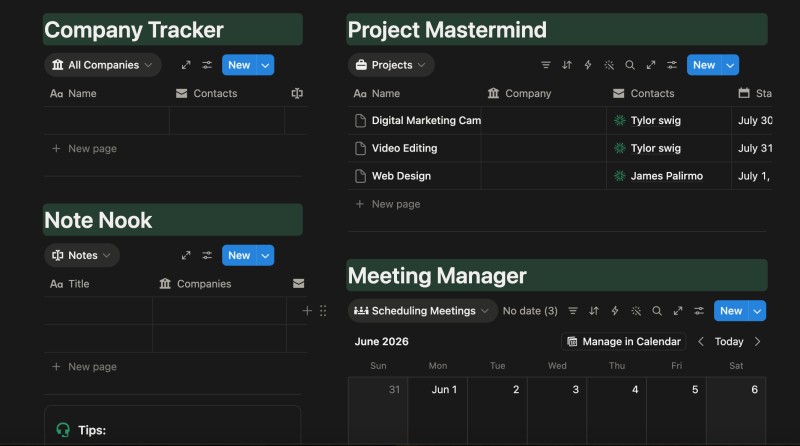
Track every active project by client. Start date, end date, task breakdown, and progress — all linked to the contact who hired you. Three views: a projects list, a task-oriented planning view, and a detailed project layout.
So what does that mean for you?
It means your client relationships and your deliverables live in the same place. When Adaeze asks for an update, you are not searching through Trello, then email, then WhatsApp. You click her name in ClientGrid and see everything — contact history, project status, and notes — in one place.
5. Meeting Manager
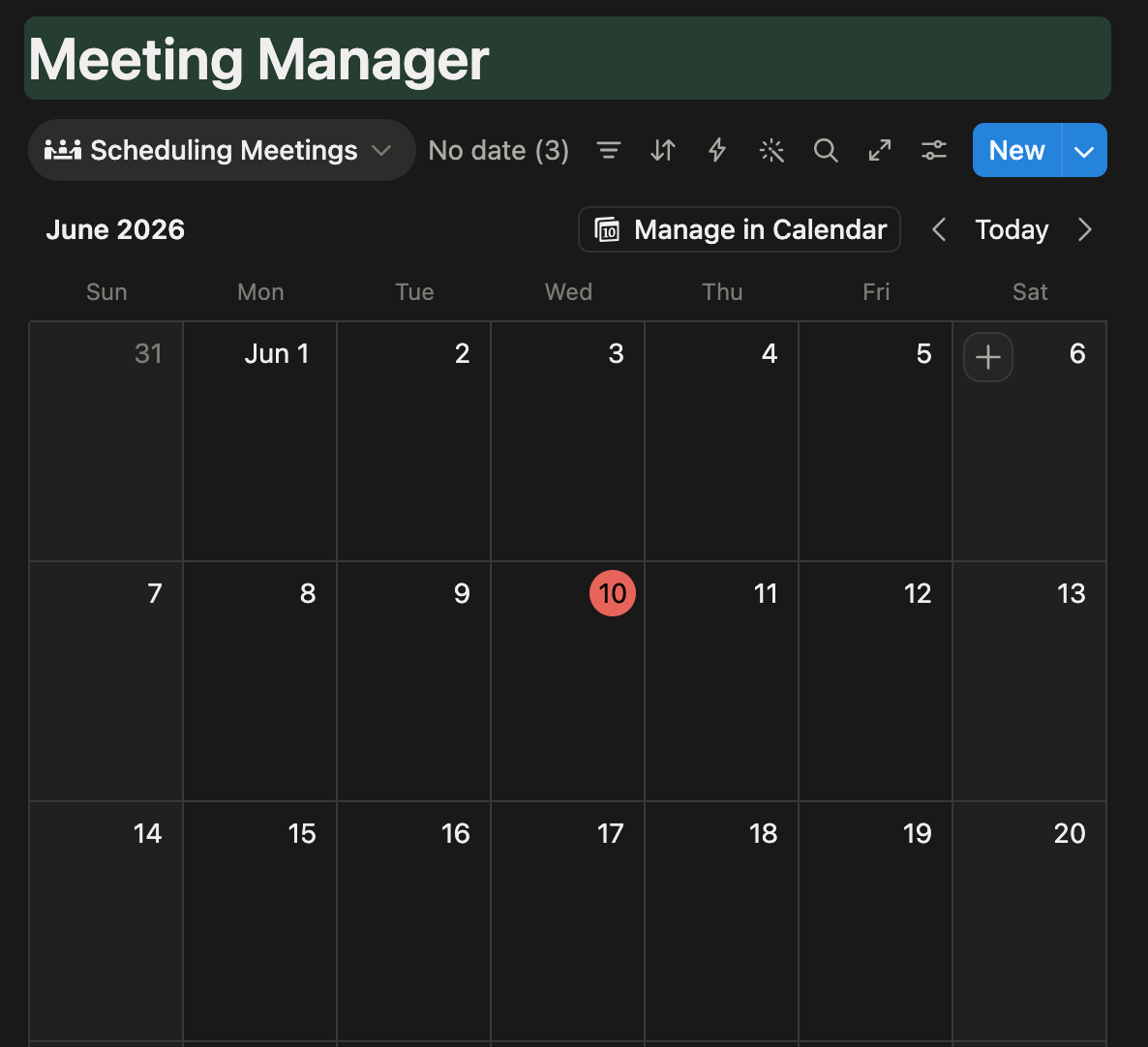
A full calendar view of every scheduled meeting, linked to the right client and project. See what is coming up this week, this month, and beyond — without cross-referencing your phone calendar and your client list.
So what does that mean for you?
It means no more missed calls. No more 'wait, is that today?' moments. Your meeting schedule is connected to the clients it involves, so walking in prepared is the default — not the exception.
6. Note Nook
A dedicated space for every important note, linked to the right company and the right contact. Client preferences, conversation summaries, action items, promises you made and promises they made — all organized and retrievable in seconds.
So what does that mean for you?
It means you remember everything. Not because your memory is extraordinary, but because your system is. When you call Tunde three months after your last conversation and you open his notes before the call, you are not just prepared — you are the kind of professional clients refer to other clients.
ClientGrid was built specifically for:
✓ Freelancers managing five or more clients and operating mostly from memory and scattered tools.
✓ Agency owners running multiple client projects simultaneously and struggling to see the full picture without bouncing between apps.
✓ B2B founders growing a client list faster than your current system can handle — which might be a spreadsheet, or might be nothing at all.
✓ Consultants and service providers delivering excellent work but wanting the client experience to match the quality of the output.
✓ Anyone who has ever lost a deal, a client, or a referral to disorganization and does not want to lose another one.
ClientGrid is NOT for:
✗ People who want to pay a monthly subscription for a CRM with features they will never use.
✗ People who are comfortable managing clients from WhatsApp and do not see the cost of that approach.
✗ People who are looking for a free tool and are not yet ready to invest in the systems their business needs.
✗ People who have fewer than three clients and do not see themselves growing beyond that.
If you are in the first group, this was built for you. If you are in the second group, come back when the cost of not having a system becomes undeniable. It will.
You might be thinking:
"I don't know Notion well enough to use this."
ClientGrid is pre-built. Every database, view, and link is already set up. You are not building anything. You are filling in a system that is already organized.
If you have ever added a row to a spreadsheet, you can use ClientGrid. The most complex action required is typing a name in a table. That is it.
"I already use a spreadsheet. Why do I need this?"
A spreadsheet is a grid. ClientGrid is a connected system. Your contacts link to their projects. Their projects link to their meetings. Their meetings link back to their contact history. Your spreadsheet cannot do that.
The difference is the difference between a list and a map. A list tells you what exists. A map tells you how everything relates. When you are managing real client relationships, you need the map.
"Is Notion free? Will I need to pay more after buying this?"
Notion has a free plan. ClientGrid was deliberately built to work fully on that free plan. You pay once for the template. Nothing else. No monthly fees. No platform subscriptions. No upsells.
"Will I actually use this, or will it be another thing I abandon?"
This is the most honest objection and it deserves a direct answer.
Most CRM tools get abandoned because they were built for systems that do not match how you work. They require too much data entry. They have too many screens. They assume a sales team, not a solo operator.
ClientGrid was built to be the CRM you actually open every day. It is simple enough to maintain in five minutes a morning. It is organized enough to give you real clarity on your business. It was designed for how Nigerian freelancers and agency owners actually operate — not for how Silicon Valley assumes everyone operates.
Use it for five days. If you do not find yourself opening it daily, that will be a first.
"Can I customize it for my specific workflow?"
Yes. Completely. Add columns. Rename pipeline stages. Change database views. Create new linked databases. ClientGrid is a starting system — a professionally designed foundation that you build on top of, not a rigid tool that forces you into its process.
Imagine a Monday morning, four weeks from today.
You open ClientGrid before anything else.
Your Dashboard shows you that two projects are in progress — both on track. One proposal is pending. You can see the last time you contacted the prospect: eight days ago. The note you made after the call is right there: 'Waiting on approval from their board. Follow up 14th.'
Today is the 14th.
You send a two-line message. Professional. Timed. Not too eager, not too absent — exactly right. Because you had a system that told you exactly when to show up.
A new client comes through from a referral. You add them to Contacts in ninety seconds. You link them to a new project. You schedule the onboarding call in the Meeting Manager. Done. The information will never be lost. The follow-up will never be forgotten.
Six months from now, you have a client roster with twenty names. Every one of them has a complete history in ClientGrid. Every deal they were involved in. Every conversation you had. Every note you made. Every project you delivered.
When a client messages you and says 'remember that thing we discussed last year about expanding the retainer?', you do not scramble. You open their profile, scroll to the note from that conversation, and respond with specificity that makes them feel like the most important client you have.
Because in that moment, with that information in front of you, they are.
The clients who feel remembered refer you. The clients who feel like a number don't.
That is what ClientGrid is not selling you. It is selling you the system that makes all of that possible — consistently, reliably, without depending on memory or energy you may not always have.
Use this section to display real testimonials as they come in. Below are the exact structures your testimonials should follow for maximum credibility:
"I had 12 active clients and I was managing everything from WhatsApp and a notes app. I set up ClientGrid in one afternoon. By the end of the first week I had already followed up on two proposals I would have forgotten about entirely. One of them closed. That single deal covered everything."
— Freelance brand strategist, Lagos
"Running an agency with five clients, I used to spend the first twenty minutes of every Monday just trying to remember where everything stood. Now I open ClientGrid and I know in thirty seconds. That hour I get back every week is worth more to me than I paid for this."
— Creative agency founder, Abuja
Note: These are illustrative frameworks. Replace with exact quotes from real buyers. When collecting testimonials, ask specifically: 'What was your client management situation before? What changed after? What was the first moment you felt the difference?' Specificity is the whole game.
Let's talk about the investment.
ClientGrid is ₦5,000.
One-time. No subscription. No renewal. No platform fee. You pay once, you get the template, you use it forever.
Now let's put ₦5,000 in context.
What ₦5,000 is in this market
A dinner for one at a mid-range Lagos restaurant. A month of Netflix. One Uber ride from the Island to the Mainland. One week data subscription.
What ₦5,000 is not
It is not a monthly subscription. It is not a recurring cost. It is not an enterprise CRM that costs more per month than you billed in your first client engagement. It is a one-time purchase for a system that will operate in your business every day for the next several years.
But let us do a more honest comparison.
If you close one deal per month, even a small one, on average, what is that worth to you? If the answer is ₦50,000, then a system that helps you close one extra deal per quarter because you followed up at the right time has already paid for itself forty times over.
The question is not whether ₦5,000 is worth it.
The question is whether disorganization is worth what it is actually costing you.
The clients you have not followed up with — how much is that?
The deal that went cold because you messaged three weeks too late — how much was that?
The referral that did not happen because a client's experience felt slightly scattered — how much was that?
₦5,000 is not the cost of ClientGrid.
₦5,000 is what you pay to stop paying the real cost.
ClientGrid — ₦5,000. One-time. Yours forever.
✓ Dynamic Dashboard — your full operation at a glance
✓ Sales Pipeline — every deal tracked from lead to close
✓ Contacts Management — every client detail organized with follow-up dates
✓ Project Mastermind — deliverables tracked by client
✓ Meeting Manager — full calendar, linked to the right contacts
✓ Note Nook — every conversation stored and searchable
✓ Works on Notion's completely free plan
✓ Instant access — download link delivered immediately after purchase
✓ Fully customizable — add columns, rename stages, build on top of it
Here is what happens next.
You click the button below. You go to the Selar checkout page. You complete your payment — card or bank transfer, whichever you prefer. Selar sends you a download link immediately. You click the link, it takes you to a Notion template URL, you click 'Duplicate,' and ClientGrid is added to your Notion workspace.
You spend twenty minutes adding your current clients. You set follow-up dates. You log your active deals in the pipeline.
And then something shifts.
You open your laptop the next morning and instead of starting the day by reconstructing your business from memory and scattered apps, you open one workspace and you know exactly where you stand.
There is no urgency trick here. ClientGrid is not going anywhere. The price may change as we add to it, but there is no countdown timer and there is no artificial scarcity.
The only honest urgency is this:
Every week you wait is another week deals leak through the cracks of a system that was never built to hold them.
That lead who said 'let me think about it' — the one you haven't followed up with — they are thinking about it right now. Someone else may have already followed up.
The referral you could have gotten from the client you haven't checked in on in three months — that window is still open. For now.
The next client who is deciding between you and a competitor who seems more organized — that decision is being made based on signals you are sending right now.
P.S.
If you skipped to the end — here is the short version: ClientGrid is a complete Notion CRM for Nigerian freelancers and agency owners. Six sections. One workspace. One-time ₦5,000 on Selar. No subscriptions. Works on Notion's free plan. You get the Pipeline, Contacts Management, Project Mastermind, Meeting Manager, Dynamic Dashboard, and Note Nook — all connected, pre-built, and ready to use in twenty minutes.
P.P.S.
There is a lead in your pipeline right now that you have not followed up with. ClientGrid will fix that permanently. Get it today.