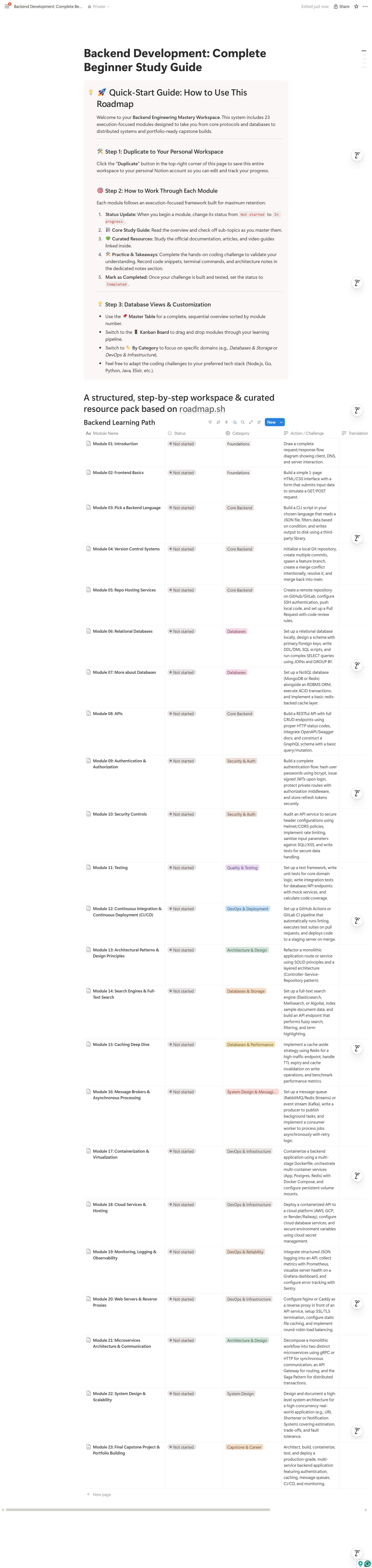
Backend Engineering Mastery Roadmap (23-Module Notion Workspace)
🚀 Backend Engineering Mastery Roadmap (23-Module Notion Workspace)
Stop drowning in endless tutorials. Master backend engineering with a structured, execution-first system inside Notion.
Learning backend development can feel overwhelming. You save dozens of bookmark links, watch hour-long video playlists, and still wonder: "Am I actually job-ready? What should I build next?"
The Backend Engineering Mastery Roadmap solves this. Built directly on top of industry-standard roadmap.sh standards, this interactive Notion system transforms passive tutorial watching into active engineering execution.
Whether you’re stepping up from frontend, solidifying computer science fundamentals, or preparing for backend system design interviews—this workspace gives you a clear, structured path from HTTP protocols to distributed microservices.
📦 What’s Inside the Workspace?
You get immediate access to a complete 23-module interactive database covering the entire modern backend developer stack:
🎯 23 Production-Grade Modules
- Module 01: Introduction & Web Mechanics
- Module 02: Frontend Basics for Backend Engineers
- Module 03: Language & Environment Setup
- Module 04: Version Control Systems (Git Internals)
- Module 05: Repo Hosting & Code Review Workflows
- Module 06: Relational Databases & SQL Deep Dive
- Module 07: NoSQL Databases & Document Stores
- Module 08: RESTful API Architecture
- Module 09: Authentication & Authorization (JWT, OAuth2, RBAC)
- Module 10: Security Controls & OWASP Mitigation
- Module 11: Automated Unit & Integration Testing
- Module 12: CI/CD Pipelines & Deployment Automation
- Module 13: Architectural Patterns & Clean Code (SOLID)
- Module 14: Search Engines & Full-Text Search
- Module 15: Caching Strategies & Redis Mechanics
- Module 16: Message Brokers & Async Processing (RabbitMQ/Kafka)
- Module 17: Containerization & Docker Orchestration
- Module 18: Cloud Infrastructure & Serverless Hosting
- Module 19: Monitoring, Logging & Observability (Prometheus/Grafana)
- Module 20: Web Servers & Reverse Proxies (Nginx/Caddy)
- Module 21: Microservices Architecture & gRPC Communication
- Module 22: System Design & High-Concurrency Scalability
- Module 23: Final Capstone Project & Portfolio Execution
⚡ Inside Every Single Module
Each page follows a standardized Dual-Header Framework designed for high retention and portfolio proof:
- 📚 Core Study Guide: Executive summary and granular sub-topic checklists.
- 💚 Curated Learning Resources: Hand-picked documentation, deep-dive articles, and official tutorials.
- 🛠️ Hands-On Action Challenge: Practical engineering exercises to prove mastery (e.g., implementing JWT refresh token rotation, setting up Docker multi-stage builds, configuring Redis cache invalidation).
- 📝 Dedicated Workspace Block: Formatted space to store your architecture diagrams, code snippets, CLI cheatsheets, and personal notes.
🗂️ Built for Notion Productivity
- 📌 Master Table View: Track module progress from
Not startedtoCompleted. - 🚦 Kanban Board View: Drag and drop modules across your personalized learning pipeline.
- 🏷️ Categorized Grouping: Filter by domain (Databases, Security, DevOps, System Design).
- 🌓 Mode Compatible: Fully optimized styling and custom icons for both Light and Dark mode.
👤 Who Is This For?
- Self-Taught Developers & Bootcamp Graduates: Move past surface-level tutorials and build real backend depth.
- Frontend / Full-Stack Engineers: Bridge gaps in databases, Docker containerization, security, and cloud deployment.
- Computer Science Students & Job Seekers: Build a portfolio-grade Capstone project and prep for technical system design interviews.
❓ Frequently Asked Questions
How do I access the template after purchasing?
Upon purchase, you’ll receive an instant link to the Notion template. Simply click "Duplicate" in the top-right corner to copy the entire workspace into your personal Notion account.
Do I need a paid Notion account?
No! This template works completely on Notion’s Free plan.
What programming language does this roadmap support?
The concepts and challenges are language-agnostic. Whether you write Node.js/TypeScript, Go, Python, Java, Elixir, or C#, the architectural principles remain identical.
🎟️ Ready to level up your backend engineering skills?
Click "I want this!" to duplicate your workspace and start building today.