Epson L1800 Adjustment Program (Instant Download)

The Epson L1800 Resetter, also known as the Epson L1800 Adjustment Program, is a crucial tool for resolving printer errors related to waste ink pad counter replacement in the Epson L1800 inkjet printer. This powerful and reliable photo printing device is ideal for use at home and is a popular choice among users. However, even the most dependable devices can encounter errors, and the Epson L1800 is no exception. When faced with the need to replace the waste ink pad counter, users may see a message from the printer driver and notice two red lights flashing on the product panel. Fortunately, with the Epson L1800 Resetter, resolving this issue is a simple process that can help users get back to printing high-quality photos with ease.
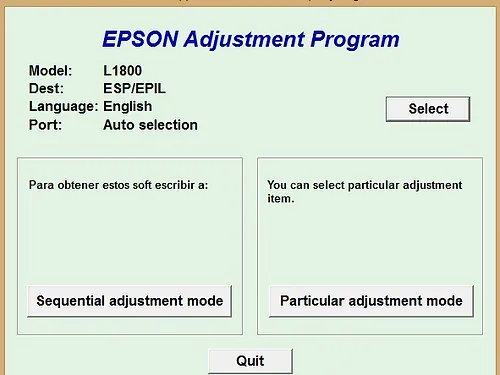
Epson L1800 Adjustment Program how to reset Printer Step By Step
(Your system installs the driver Epson L1800)
You First Need Antivirus On Computer Windows 7
How to disable Antivirus On Windows 10
- First your printer on
- And USB connects the cable
- Next step Extract file (password: no)
- The adjustment mode particular
- Then click the OK button
- And waste ink pad counter
- After giving the checkbox main pad counter
- Click the OK button
- Check initialization – OK button
- Then close the adjustment program Epson L1800
- Turn off your printer
- Then turn on back
read also: Epson l380 adjustment program
Epson L1800 Adjustment Program – Reset Tool
How to the ink pad fix and reset the program?
Your printer is the L1800 printer ink pad counter complete, then all lights flashing. It would be best if you had reset the L1800 with the resetter below can then download the new L1800 machine and then adjust it to Fix below the resetter. This reset is available at the below link