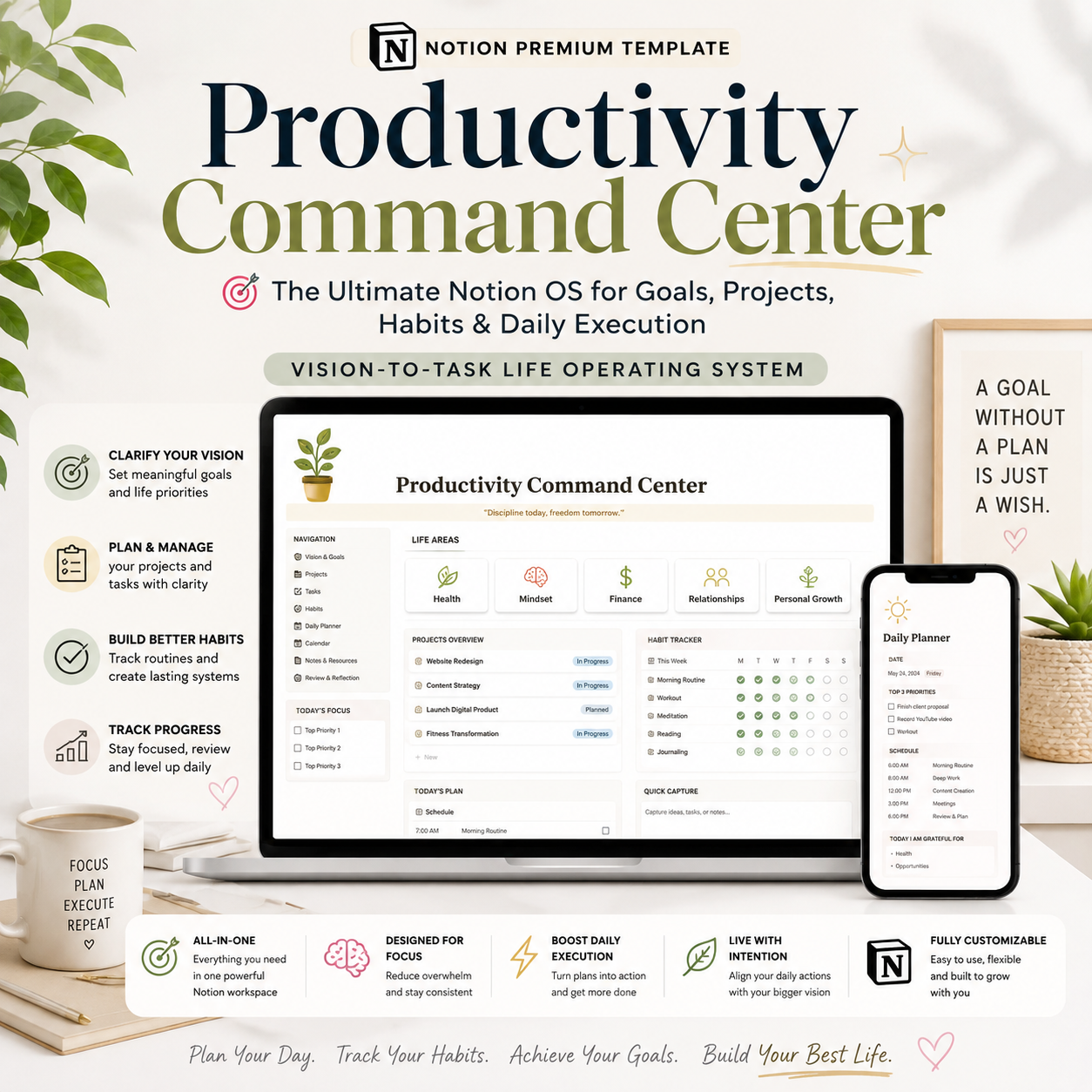
Productivity Command Center — The Ultimate Notion OS for Goals, Projects, Habits & Daily Execution | Vision-to-Task Life Operating System

🧭 Most planners give you a task list. This gives you a reason for the task list.
You've probably tried a habit tracker. A goal-setting template. A weekly planner. A notes app. Maybe all four — in four different tools that never once talked to each other. So every Sunday you're rebuilding your week from scratch, and every task you complete feels disconnected from anything that actually matters.
Productivity Command Center fixes that by being one relational system instead of a stack of disconnected planners. Every level — from your long-term vision down to today's 3pm task — is connected, so you can always answer one question:
Why am I doing this task?
And trace it, instantly:
TASK → PROJECT → MONTHLY OUTCOME → QUARTERLY OBJECTIVE → ANNUAL GOAL → LIFE AREA → VISION
That's the difference between a planner and an operating system.
🔁 THE CORE PRODUCTIVITY LOOP
Everything in this system flows through one connected cycle:
VISION → ANNUAL GOALS → QUARTERLY OBJECTIVES → MONTHLY OUTCOMES → WEEKLY PRIORITIES → DAILY ACTIONS → TASKS / HABITS / ROUTINES → COMPLETION → REVIEW → INSIGHTS → ADJUSTMENT → NEXT CYCLE
It's built to answer five questions, every single day:
- Where am I going?
- What matters right now?
- What should I do today?
- What is falling behind?
- What should I change next week, month, or year?
👤 WHO THIS SYSTEM IS FOR
- Entrepreneurs & founders juggling strategy and daily execution
- Freelancers and solopreneurs managing multiple client projects
- Creators and consultants who need one system, not five apps
- Coaches and consultants tracking client work alongside personal goals
- Students and professionals managing deadlines, habits, and long-term goals together
- Anyone who has started (and abandoned) a habit tracker, a goal planner, and a to-do app — separately — and wants them to finally work as one system
If you've ever set a New Year's goal in January and completely lost track of it by March, this system was built to fix exactly that.
🧩 WHAT'S INSIDE — 7 CONNECTED HUBS, 21 DATABASES
HUB 1 · Command Center Your daily operating dashboard — today's priorities, overdue tasks, upcoming deadlines, active projects, habit snapshot, current goals, weekly/monthly progress, and quick-action buttons, all in one place.
HUB 2 · Goals & Direction Vision, Annual Goals, Quarterly Objectives, Monthly Outcomes, Areas of Life, Key Results, milestones, and goal reviews — so every goal has a home and a measurable progress bar, not just a wishlist entry.
HUB 3 · Planning Center Full Year, Quarter, Month, Week, and Day planners plus a connected calendar, priorities, and time blocks — each level automatically rolls up into the next.
HUB 4 · Execution Center Tasks, Projects, Milestones, Next Actions, Waiting For, Delegated Tasks, recurring tasks, and deadlines — a real execution engine, not a flat to-do list.
HUB 5 · Habits & Routines Habit tracking with logs and performance data, plus morning, evening, weekly, and monthly routines and personal rituals — built for consistency, not guilt.
HUB 6 · Review & Analytics Daily, weekly, monthly, quarterly, and annual reviews, a Personal Productivity Score, goal progress, habit performance, completion rate, and focus/time analysis — so you actually learn from your weeks instead of just living through them.
HUB 7 · Knowledge & Life Management Notes, ideas, resources, reading list, learning log, personal reference, and a Someday/Maybe list — the catch-all for everything that isn't a task yet but shouldn't be forgotten.
⚙️ 21 FULLY RELATIONAL DATABASES
Areas of Life · Vision · Annual Goals · Quarterly Objectives · Monthly Planner · Weekly Planner · Daily Planner/Log · Task Manager · Projects · Milestones · Habits · Habit Log · Routines · Calendar & Events · Time/Focus Sessions · Notes & Knowledge · Reading & Learning · Someday/Maybe · Reviews · Decisions · Personal Metrics
Every database connects to the ones around it — goals roll up into areas, tasks roll up into projects and months, habits roll up into weekly and monthly reviews — so you're never maintaining the same information in two places.
📊 DASHBOARDS FOR EVERY TIME HORIZON
- Command Center — the daily hero dashboard with today's focus and a right-side alert rail
- Weekly Command Center — this week's outcome, top priorities, and progress
- Monthly Dashboard — theme, big outcome, top 3 priorities, and end-of-month review
- Quarterly Dashboard — objectives, key results, and progress tracking
- Yearly Dashboard — a full Yearly Goal Matrix across every Area of Life
- Analytics Page — execution, project, goal, habit, and focus metrics in one view
- Personal Productivity Score — a reflective (not judgmental) weekly snapshot across task completion, goal progress, project progress, habit consistency, and focus execution
🚦 A REAL ALERT SYSTEM — NOT JUST COLORED LABELS
- 🔴 Red Alert: overdue critical tasks, goals marked At Risk, projects past deadline
- 🟡 Amber: tasks due soon, projects approaching deadline, habits falling below target
- 🟢 Green: completed priorities, goals on track, projects on schedule
Built with thoughtful empty states too — so an empty dashboard reads as "clear schedule," not "broken template."
🎯 REVIEW ENGINES THAT ACTUALLY CLOSE THE LOOP
Most planners let tasks disappear the moment they're checked off. This system runs a structured review at every level — Daily, Weekly, Monthly, Quarterly, and Annual — each one capturing wins, what didn't work, lessons learned, and what carries forward into the next cycle. Your Annual Review pulls directly from twelve months of weekly and monthly reviews, so "an accurate year in review" is a real page, not a guess in December.
🧠 INBOX, FOCUS MODE & PROJECT WORKSPACES
- Inbox / Capture System — a single place to dump every idea, task, and thought before it's sorted, so nothing gets lost mid-thought
- Focus Mode — a distraction-minimized page for deep work sessions
- Project Workspace Template — a dedicated page per project connecting its milestones, tasks, notes, and timeline
- Mobile Dashboard — a lightweight version built for capturing tasks and checking priorities from your phone
🎨 DESIGNED TO FEEL PREMIUM, NOT CLUTTERED
This system follows a restrained, editorial design system — calm, minimal, and professional. No rainbow color-coding, no wall-to-wall emojis, no dense tables jammed onto the homepage. One accent color, clear hierarchy, and a homepage that stays lightweight so it's a system you'll actually open every day — not one you set up once and abandon.
💼 WHY THIS IS A PRODUCTIVITY OPERATING SYSTEM — NOT JUST ANOTHER PLANNER
✅ Fully relational — every database connects; nothing is duplicated across five separate pages
✅ Traceable hierarchy — every task can be traced back to the goal and vision behind it
✅ Built for every time horizon — day, week, month, quarter, and year all connect automatically
✅ Real review engines — structured reflection at every level, not just a blank journal page
✅ Habit + goal + task integration — consistency tracking lives next to your actual goals, not in a separate app
✅ Reusable forever — run unlimited years, quarters, and projects through the same system
✅ Premium, calm design — built to be opened daily, not abandoned after week two
📦 WHAT'S INCLUDED
- The complete Productivity Command Center Notion OS — all 7 hubs, 21 databases, fully connected
- Pre-built dashboards for every time horizon (daily, weekly, monthly, quarterly, yearly)
- Daily, Weekly, Monthly, Quarterly, and Annual Review templates
- Habit & Routine tracking system with performance analytics
- Inbox/Capture system and dedicated Focus Mode
- Mobile-optimized dashboard
- Starter/demo data clearly marked so you can explore before you commit to your own setup
- Step-by-step Welcome & Onboarding page (9-step setup walkthrough)
- Lifetime access + free updates
❓ FAQ
Do I need a Notion paid plan? No — this system works fully on Notion's free plan for individual use.
Is this only for entrepreneurs? No — while it's built to handle business and career goals, the Areas of Life structure covers health, relationships, learning, and personal life just as fully. Students, professionals, and anyone managing a full life (not just a business) will find it works the same way.
What if I don't want to set up 21 databases myself? You don't have to build anything — the entire system, including relations, rollups, and formulas, is pre-built. You duplicate it into your own Notion workspace and start filling it in.
Can I remove the sample data? Yes — all demo/starter data is clearly marked "DEMO — DELETE AFTER SETUP" so you can clear it in minutes and start with a clean workspace.
Does it work on mobile? Yes — a dedicated mobile dashboard keeps quick capture and daily priorities accessible from your phone.
How is this different from a habit tracker or weekly planner template I could get for free? Those tools track one layer. This system connects all of them — your 10-year vision down to today's task — so nothing you do daily is disconnected from what you actually want long-term.
The test this system is built to pass:
Can you open one page, see today's priorities, and trace every single one of them back to the goal and vision that made it matter — without opening a second app?
Productivity Command Center says yes.
FEATURE
- 🧭 Fully connected hierarchy: Vision → Year → Quarter → Month → Week → Day → Task
- 🎯 Goals & Direction hub: Vision, Annual Goals, Quarterly Objectives, Key Results
- 🗓️ Planning Center: Year, Quarter, Month, Week & Day planners + Calendar
- ✅ Execution Center: Tasks, Projects, Milestones, Waiting For, Delegated Tasks
- 🔁 Habits & Routines hub with habit logs and performance tracking
- 📊 Review & Analytics: Daily, Weekly, Monthly, Quarterly & Annual review engines
- 🧠 Knowledge & Life Management: Notes, Reading List, Learning, Someday/Maybe
- 🚦 Built-in Red/Amber/Green alert system for overdue and at-risk items
- 📈 Personal Productivity Score across tasks, goals, projects, habits & focus
- 📥 Inbox/Capture system for frictionless idea and task capture
- 🎯 Dedicated Focus Mode for deep work sessions
- 📱 Mobile-optimized dashboard for on-the-go planning
- 🎨 Calm, premium, editorial design system — not cluttered or overwhelming
- 🧪 Pre-loaded starter data clearly marked for easy cleanup
- 📘 9-step Welcome & Onboarding walkthrough included