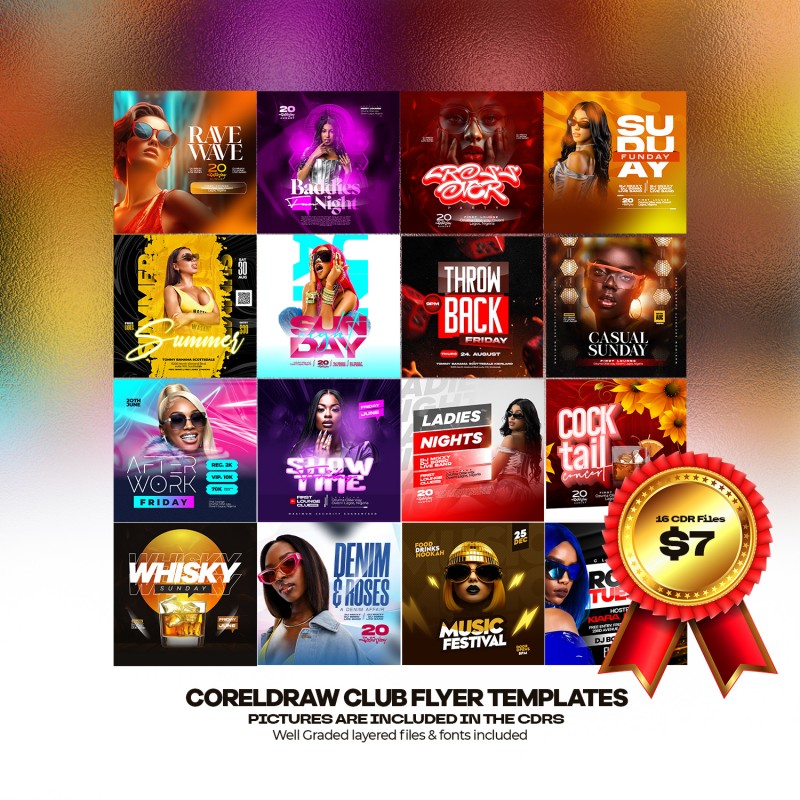
CORELDRAW CLUB TEMPLATE (Volume 1)

Unlock your creativity with the CORELDRAW CLUB TEMPLATE (Volume 1), a must-have collection of professionally designed templates for CorelDRAW users.
Perfect for promoting events, parties, or club memberships, this volume delivers high-quality, print-ready designs that save you time and effort.
Whether you're a beginner or a seasoned professional, the intuitive templates provide a solid foundation for bringing your vision to life.
Download now and unlock a world of creative possibilities for your next club project!
Features:
✅ High-Quality Templates – Editable .CDR files for easy customization
✅ Versatile Designs – Suitable for branding, promotions, and print projects
✅ Time-Saving – No need to start from scratch; just tweak and go!
✅ Commercial Use – Use these templates for personal or client projects
How to Use This Template
- Install the Fonts
- Locate the font files included with your template download.
- Double-click each font file and click "Install" to add them to your system.
- Restart CorelDRAW if it was open during installation to ensure fonts are recognized.
- Open the Template in CorelDRAW
- Make sure you are using CorelDRAW version 24 or higher for full compatibility.
- Open the template file (.cdr) in CorelDRAW.
- Edit Text
- Select any text element you want to change.
- Replace the placeholder names and details with your text.
- The installed fonts will automatically apply to the text.
- Replace Pictures
- Select the picture frame or image placeholder.
- Right-click and choose "Replace Image" or use the "PowerClip" feature.
- Browse and select your desired image from your files.
- Adjust the image position and size within the frame as needed.
- Customize Colors and Elements (Optional)
- Use CorelDRAW’s tools to adjust colors, effects, or add new design elements.
- Keep your design consistent with the original style or personalize it.
- Save and Export
- Save your edited file.
- Export your design in the desired format (JPEG, PNG, PDF) for sharing or printing.
All the elements are modifiable and customizable.
The texts can be modified with the CorelDRAW text tool.
Ideal for entrepreneurs, agencies, and creatives looking to streamline their workflow.
Grab yours now and elevate your designs instantly!
🔥 Get the CORELDRAW CLUB TEMPLATE (Volume 1) today and design like a pro! 🔥