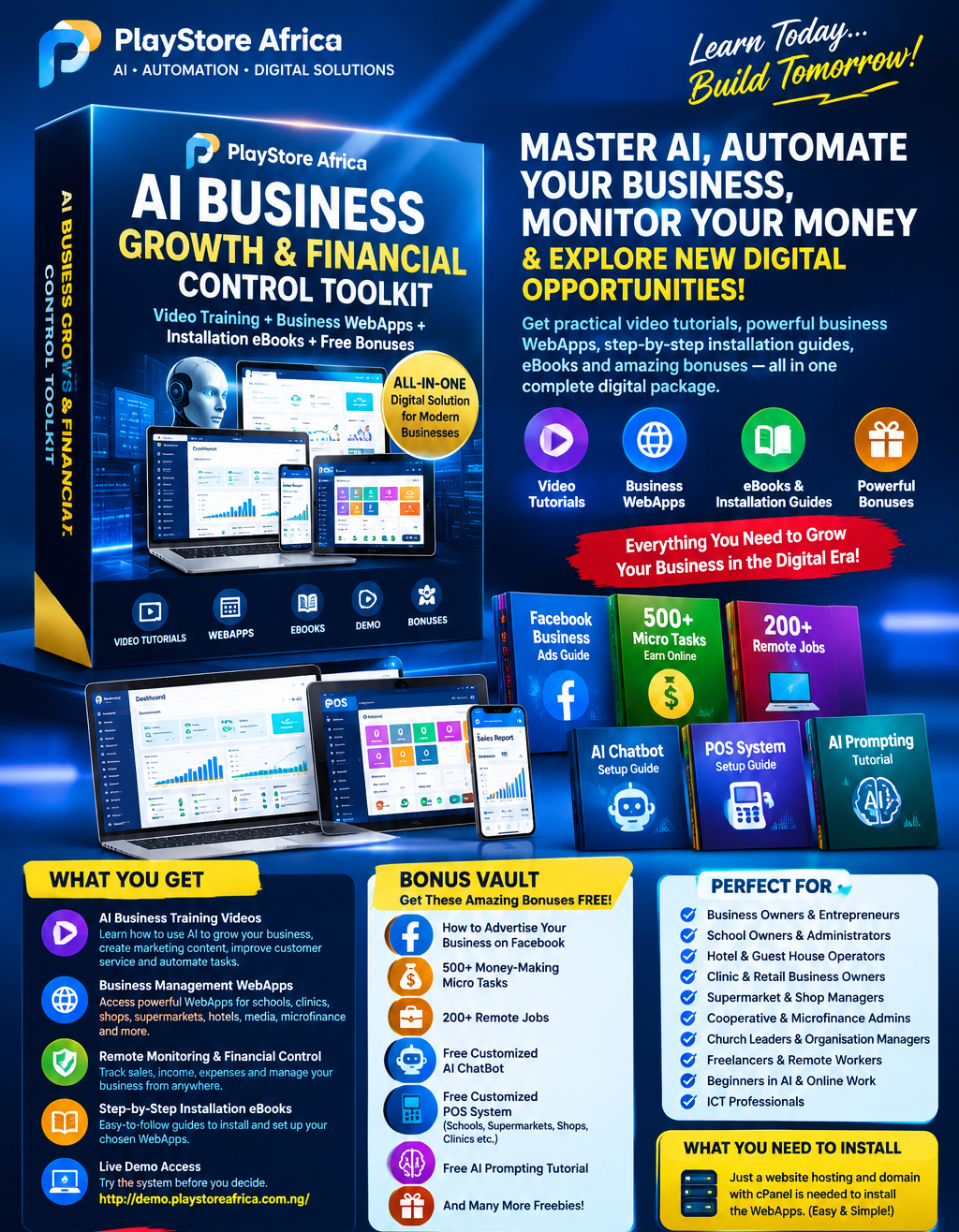
AI BUSINESS GROWTH & FINANCIAL CONTROL TOOLKIT

Master AI, Automate Your Business, Monitor Your Money & Build Smarter Digital Opportunities!
One powerful digital package. Practical AI tutorials. Business management WebApps. Installation guides. eBooks. Demos. Valuable bonuses.
Are you a business owner, school proprietor, hotel manager, clinic operator, shop owner, entrepreneur or aspiring digital professional looking for smarter ways to run a business, manage transactions, attract customers and take advantage of Artificial Intelligence?
Welcome to the AI Business Growth & Financial Control Toolkit by PlayStore Africa — a practical digital learning and business automation package designed to help you discover how AI and purpose-built WebApps can support your daily operations, improve record-keeping, simplify repetitive tasks and help you identify new opportunities for growth.
Instead of learning about AI without knowing how to apply it, explore practical tutorials, demonstrations, software solutions and easy-to-follow resources designed to help you put digital technology to work.
Imagine being able to review your business records from your phone, check payments while away from your office, track sales, manage customers, organise staff activities and use AI to support your marketing.
Your business can become more organised, more digitally capable and easier to monitor — when the right tools are properly installed and used.
WHAT WILL YOU GET INSIDE THIS DIGITAL PACKAGE?
1. Downloadable AI Business Training Videos
Learn practical ways to use Artificial Intelligence to support your business, marketing and everyday work.
Training topics include:
- Introduction to AI and how it can be applied to real businesses.
- How to use AI to develop business ideas, plans and strategies.
- How to create marketing content, advertisements, product descriptions and promotional messages with AI.
- How to use AI to support customer service and customer communication.
- How to generate ideas for sales campaigns and customer retention.
- How to use AI prompts to improve productivity and complete tasks more efficiently.
- How to identify repetitive business tasks that may be suitable for automation.
- How to use digital tools to support better organisation and decision-making.
The lessons are designed to help beginners understand the practical applications of AI without needing to be professional programmers.
2. Business Management & AI Automation WebApps
Discover purpose-built WebApps designed for different types of businesses and organisations.
Depending on the selected WebApp, available features and compatibility, your package may include access to downloadable software files, installation resources, platform access or instructions for installing an appropriate business system.
Explore solutions for:
- School management and school POS.
- Clinic management and clinic POS.
- Supermarkets, retail shops and general business POS.
- Hotels, guest houses and hospitality management.
- Microfinance institutions and cooperative societies.
- Radio, DJ and digital media operations.
- Business management and digital productivity.
- AI tools, chatbots and digital business resources.
Rather than relying entirely on paper records or scattered spreadsheets, explore digital systems that can help organise business operations in a more structured way.
3. Remote Business Monitoring & Financial Accountability
Learn how suitable business WebApps can help you review important business activities from a smartphone, tablet or computer, wherever you have an internet connection and authorised access.
Depending on the selected system, features may include:
- Reviewing recorded sales and payments.
- Monitoring income and expenditure records.
- Tracking outstanding customer debts and unpaid fees.
- Checking transactions recorded by authorised staff.
- Reviewing receipts, invoices and payment histories.
- Monitoring product sales and stock records where supported.
- Reviewing reports to identify unusual entries or discrepancies.
- Managing staff accounts and access permissions where supported.
- Exporting reports for reconciliation and record-keeping.
- Backing up data where the system supports backup functionality.
Greater visibility. Better records. More informed supervision.
These systems can support financial accountability and help reduce opportunities for undetected errors or unauthorised activity. Effective protection also requires proper staff permissions, secure passwords, reconciliations, backups and sound business procedures. No software can guarantee that fraud or financial loss will never occur.
4. Step-by-Step WebApp Installation eBooks
You will receive installation guidance intended to make the setup process easier for beginners.
Depending on the selected WebApp, the guides may cover:
- Purchasing or preparing a domain name and compatible hosting.
- Accessing your hosting control panel through cPanel.
- Creating a MySQL database and database user where required.
- Uploading and extracting the WebApp ZIP package.
- Configuring database connection details.
- Running the installer where provided.
- Creating or securing the administrator account.
- Setting up basic business information and users.
- Testing the main features after installation.
- Troubleshooting common installation problems.
- Maintaining backups, passwords and software security.
Each WebApp has its own requirements. The applicable PHP version, database configuration, storage requirements and installation method will depend on the software supplied.
5. WebApp Demonstration
See a demonstration of the business software before making your decision.
Watch the WebApp Demo:
http://demo.playstoreafrica.com.ng/
Explore additional AI and business automation resources:
https://refer2earn.playstoreafrica.com.ng/#webapps
Discover more software and digital platforms:
https://iam.deleparagon.com.ng/hub
BUSINESS-SPECIFIC BENEFITS: WHAT CAN YOU USE THESE WEBAPPS FOR?
FOR SCHOOLS & EDUCATIONAL INSTITUTIONS
Explore digital solutions that can support:
- Student records and administration.
- School fee categories and payment records.
- Receipts, invoices and outstanding fee tracking.
- School sales and approved POS workflows.
- Staff accounts and administrative access.
- Reports to support management review.
- Better organisation of school-related financial records.
Suitable for nursery, primary and secondary schools, subject to the features of the selected system.
FOR CLINICS & HEALTHCARE BUSINESSES
Explore appropriate management and POS features for:
- Patient and customer records where supported.
- Sales, service charges and payment records.
- Receipts and invoices.
- Stock or product records where supported.
- Staff access and operational reporting.
- Reviewing recorded transactions and outstanding balances.
Healthcare providers must implement appropriate privacy, security and access controls for sensitive patient information.
FOR SUPERMARKETS, SHOPS & RETAIL BUSINESSES
Discover tools that can support:
- Recording product sales.
- Product and stock management where available.
- Sales receipts and invoices.
- Daily transaction summaries.
- Customer and debtor records.
- Inventory monitoring.
- Cashier and staff access control.
- Sales and expense reporting.
Help organise day-to-day retail operations and make business records easier to review.
FOR HOTELS, GUEST HOUSES & HOSPITALITY BUSINESSES
Depending on the selected platform, explore tools for:
- Reservations and booking records.
- Room and guest management.
- Front-desk operations.
- Restaurant and bar sales.
- Payments, receipts and invoices.
- Housekeeping and maintenance workflows.
- Inventory and operational expenses.
- Reports for management supervision.
FOR MICROFINANCE & COOPERATIVE SOCIETIES
Discover digital workflows that may support:
- Member records and onboarding.
- Savings and loan records.
- Repayment tracking.
- Outstanding balances.
- Receipts and transaction histories.
- Member account administration.
- Management reporting.
- Financial record review.
Financial institutions must ensure that any system they deploy meets their applicable regulatory, security and data-protection requirements.
FOR RADIO STATIONS, DJs & DIGITAL MEDIA BUSINESSES
Explore media-oriented software and workflows that can help with:
- Radio and DJ operations.
- Digital broadcasting workflows.
- Media business administration.
- Related sales and financial records where supported.
- Organising selected operational activities.
Actual broadcasting, AutoDJ, streaming and scheduling features depend on the selected product and its supported integrations.
FOR CHURCHES, ORGANISATIONS & OTHER BUSINESSES
Suitable digital workflows may also support:
- Member or customer records.
- Income and expense tracking.
- Payment and contribution records.
- Sales and service transactions.
- Staff access permissions.
- Administrative reporting.
- Routine operational organisation.
Important: Not every feature is available in every WebApp. You will receive the applicable features and requirements for the selected software. A specialised system may require configuration or additional development for your particular business.
BONUS VAULT — EXTRA DIGITAL RESOURCES
When you purchase this package, you also receive the following bonus resources according to the stated package inclusions.
BONUS 1: eBook — How to Advertise Your Business on Facebook
Learn the fundamentals of promoting your business on Facebook, including:
- Preparing a business page for advertising.
- Identifying the right audience.
- Creating attractive promotional content.
- Writing advertising headlines and calls to action.
- Understanding campaign objectives and budget planning.
- Monitoring results and improving future campaigns.
- Common advertising mistakes to avoid.
BONUS 2: 500+ Money-Making Microtask Resources
Explore a curated collection of more than 500 microtask ideas, platforms or resource listings, subject to the contents of the supplied guide.
Learn about different categories of online tasks, how to research platforms, what requirements may apply, and how to assess whether an opportunity is legitimate.
Availability, eligibility, payment methods and earnings vary by platform. This bonus does not guarantee employment or income.
BONUS 3: 200+ Remote Job Resources
Access a guide featuring more than 200 remote-work opportunities, job platforms, employer resources or listings, depending on the supplied edition.
Explore potential opportunities in areas such as:
- Virtual assistance.
- Customer support.
- Writing and content creation.
- Digital marketing.
- Design and media production.
- Information technology.
- Administration and online support.
Job openings, hiring requirements and platform availability change. Always verify current opportunities through official sources and never pay suspicious recruitment fees.
BONUS 4: Free Customized AI Chatbot
Receive a basic customized AI chatbot setup for your eligible business, subject to the stated package scope and technical compatibility.
A suitable chatbot may help with:
- Answering frequently asked questions.
- Explaining products or services.
- Providing business information.
- Guiding customers to relevant pages.
- Supporting lead collection where configured.
- Improving the availability of routine customer responses.
Advanced integrations, third-party API charges, paid AI usage, hosting and additional development are not included unless expressly stated in your purchase offer.
BONUS 5: Free Customized POS System
Receive a basic customized POS starter setup for an eligible business, subject to the scope and compatibility of the included POS solution.
Potential uses include schools, supermarkets, shops, clinics and other businesses.
Depending on the supplied POS system, features may include product or service recording, sales entry, receipts, customer records, inventory, payment tracking and reports.
Your selected business type, branding and basic configuration will determine the available customization. Hosting, domain registration, hardware, payment gateway charges, advanced integrations and additional development are separate unless explicitly included.
BONUS 6: Free AI Prompting Tutorial
Learn how to communicate more effectively with AI tools.
Discover how to write prompts for:
- Business planning.
- Social media content.
- Advertising copy.
- Customer service messages.
- Product descriptions.
- Business reports.
- Research and brainstorming.
- Daily productivity.
Learn how to give an AI tool clearer instructions, useful context and specific output requirements.
BONUS 7: More Digital Business Resources
You may also discover additional guides, templates, learning materials and digital resources supplied with the package.
Any additional bonus will be provided according to its stated availability and package terms.
WHO SHOULD BUY THIS PACKAGE?
This toolkit is suitable for:
- Business owners who want to explore AI and automation.
- School proprietors and administrators.
- Hotel and guest-house operators.
- Clinic and retail business owners.
- Supermarket and shop managers.
- Cooperative and microfinance administrators.
- Church leaders and organisational managers.
- Entrepreneurs who want to improve digital marketing.
- Freelancers and aspiring digital service providers.
- Beginners interested in learning AI and online work skills.
- ICT professionals who want to explore business software solutions.
Whether you already run an established business or are preparing to start one, this package gives you a structured way to explore practical AI, software and digital business resources.
WHAT DO YOU NEED TO INSTALL A WEBAPP?
For WebApps supplied as self-hosted software, you generally need:
- A domain name for your business or chosen system.
- Compatible web hosting with cPanel access.
- The PHP version and MySQL database support required by that WebApp.
- Internet access for installation, updates and remote use.
- A computer or smartphone for managing the system.
The domain and hosting must be compatible with the selected software. A suitable hosting plan may be an additional purchase.
Follow the installation guide for the particular WebApp you receive. Some hosted platforms may have different access or setup requirements.
WHY CHOOSE PLAYSTORE AFRICA?
PlayStore Africa brings together practical learning resources, business automation software and digital solutions designed around real operational needs.
Instead of limiting your learning to theory, this package combines instructional content with opportunities to explore actual business systems and understand how they may fit into your operations.
Learn the process. Explore the tools. Apply what works for your business.
LIMITED-TIME LAUNCH OFFER
The introductory offer is designed to make this collection of AI training, business WebApps, installation resources and bonus materials more accessible to Nigerian businesses and entrepreneurs.
Why keep delaying the digital improvements your business could begin exploring today?
Start learning how to use AI more effectively, discover tools for better operational visibility and explore practical ways to improve your marketing and business processes.
HOW TO GET STARTED
- Purchase the digital package through Selar.
- Follow the delivery instructions to access the included downloads and resources.
- Watch the tutorials and review the applicable installation eBooks.
- Explore the demonstrations and choose the WebApp suitable for your business.
- Prepare the required hosting and domain if your selected software requires self-hosting.
- Follow the relevant installation guide and configure the system for your operations.
YOUR NEXT STEP
Stop treating AI as something to learn someday. Start exploring how to apply it to real business needs.
Purchase the AI Business Growth & Financial Control Toolkit and explore a practical collection of AI tutorials, business automation WebApps, installation guides, marketing eBooks, digital-work resources and bonus tools.
PLAYSTORE AFRICA — AI • AUTOMATION • DIGITAL SOLUTIONS
Protect your business records. Improve your processes. Market more effectively. Explore new digital possibilities.
Your next step towards a more digitally organised business begins here.