PHONE VIDEO EDITING BEGINNER

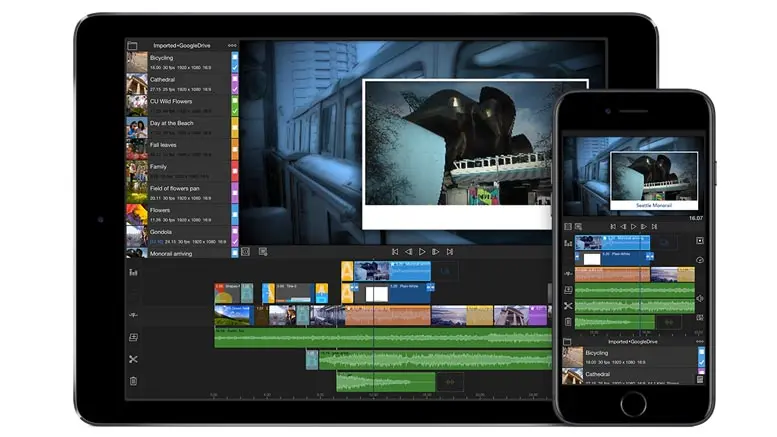
HOW TO USE A SMARTPHONE FOR VIDEO EDITING
Edit Professional-Quality Videos Right from Your Phone – No Laptop Needed!
INTRODUCTION
Think you need a computer or expensive software to edit videos? Think again.
In today’s world, your smartphone is a powerful video editing tool that fits in your pocket. Whether you're creating content for YouTube, Instagram, TikTok, or promoting a business — you can create stunning videos using just your phone.
This guide will walk you through the entire process, step-by-step, and recommend the best apps and tips to get started with video editing on your mobile device — even if you're a total beginner.
WHAT YOU NEED TO GET STARTED
Here’s a quick checklist:
- A smartphone (Android or iOS)
- A good camera (optional, but helpful)
- Enough storage space for video files
- A video editing app (more on this below)
- Internet access (for uploading or downloading resources)
- Creative energy and consistency!
BEST VIDEO EDITING APPS FOR SMARTPHONES
Here are the top apps you can use, even for free:
1. CapCut (Android & iOS)
- Features: Easy timeline editing, effects, text, music, transitions
- Best for: TikTok, Reels, short-form content
- Pros: Very beginner-friendly and powerful
2. InShot
- Features: Trim, split, filters, transitions, speed control, text, stickers
- Best for: Instagram stories, Reels, YouTube Shorts
- Pros: Clean UI, fast exports
3. VN Video Editor
- Features: Multi-layer timeline, advanced features, music & sound FX
- Best for: Vlogs, YouTube videos, cinematic edits
- Pros: No watermark, professional layout
4. KineMaster
- Features: Chroma key (green screen), layers, effects, voiceovers
- Best for: YouTube videos, green screen effects
- Pros: Pro features, but watermark in free version
5. Adobe Premiere Rush
- Features: Cross-device editing, color correction, transitions
- Best for: Brand videos, short promos
- Pros: Syncs across desktop and mobile
STEP-BY-STEP: HOW TO EDIT VIDEOS ON YOUR PHONE
STEP 1: PLAN YOUR VIDEO
- Write down your idea or script
- Decide the type of content: vlog, tutorial, promo, skit, etc.
- Gather your clips or film fresh ones with your phone camera
STEP 2: IMPORT YOUR CLIPS INTO YOUR EDITING APP
- Open the app (e.g., CapCut or InShot)
- Import the video clips, images, or audio files
- Organize them in the timeline in the order you want
STEP 3: CUT, TRIM & SPLIT
- Remove unwanted parts by trimming or splitting
- Keep only the best takes to keep your video tight and engaging
STEP 4: ADD TEXT, MUSIC & TRANSITIONS
- Use text for titles, captions, or callouts
- Add background music from the app’s free library or your own
- Use smooth transitions to switch between clips (like fade or slide)
STEP 5: ADJUST SPEED, FILTERS & COLORS
- Use slow motion or fast-forward for effect
- Apply color filters or manually adjust brightness, contrast, saturation
- Create a consistent visual style for your brand
STEP 6: EXPORT YOUR VIDEO
- Choose the highest quality available (720p, 1080p, or 4K if possible)
- Save to your gallery or upload directly to social media
TIPS FOR BETTER VIDEO EDITING ON PHONE
- Shoot in good lighting for clearer footage
- Use a tripod or stabilize your phone while filming
- Keep it short and engaging – especially for social media
- Use captions – many people watch videos with no sound
- Don’t overuse effects – keep it clean and professional
BONUS TOOLS TO LEVEL UP YOUR VIDEOS
- Remove.bg – To remove background from images for overlays
- Mixkit.co – Free video footage and sound effects
- Pexels.com – Stock video clips
- Flixier.com – Online video editor with cloud backup
- YouCut (Android) – Another simple editing app for quick videos
LEVEL UP YOUR SKILLS
- Watch editing tutorials on YouTube (e.g., "CapCut transitions", "InShot tutorial")
- Follow creators who share editing tips on TikTok or Instagram
- Practice editing every week — even small edits help you improve
- Join creator groups or editing communities online
MONETIZE YOUR VIDEO EDITING SKILLS
You can turn your smartphone editing skills into income:
- Offer video editing services to content creators or small businesses
- Edit wedding or event videos
- Manage Reels/TikTok content for influencers
- Start a YouTube channel with your content
- Sell short video templates or intros
CONCLUSION
You no longer need a laptop to be a video editor. Your smartphone can help you create everything from Instagram Reels to full YouTube vlogs.
With the right tools, practice, and a creative spark — you can produce pro-quality videos on the go. So charge your phone, download an app, and start editing your story today!
QUICK LINKS TO RECOMMENDED APPS
- CapCut: https://www.capcut.com
- InShot: Available on Google Play & App Store
- VN Video Editor: https://www.vn.io
- KineMaster: https://www.kinemaster.com
- Adobe Premiere Rush: https://www.adobe.com/products/premiere-rush.html
REGISTER NOW