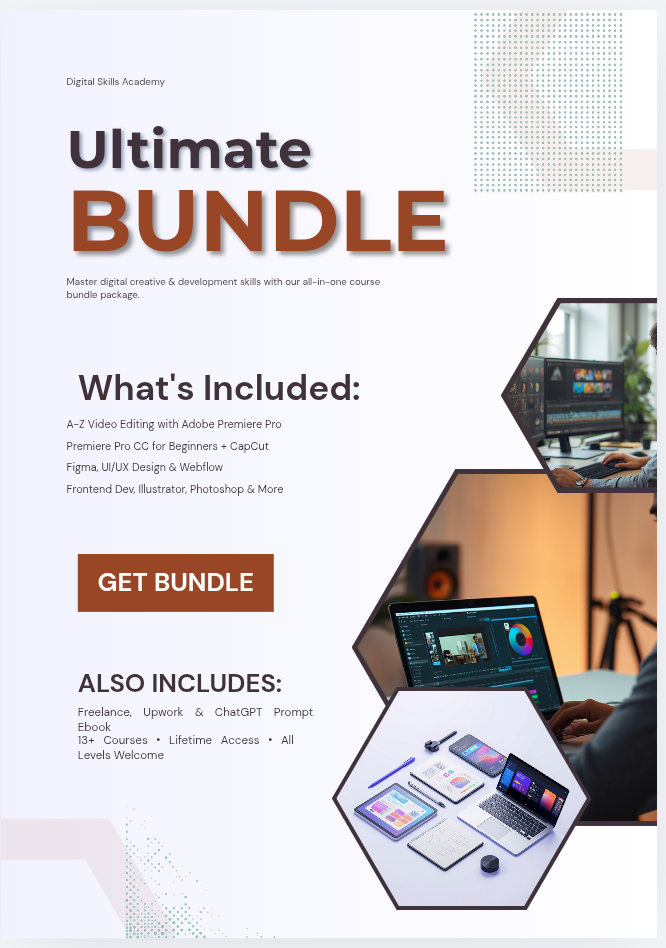
The Complete Creative & Tech Skills Bundle
THE ULTIMATE CREATIVE & TECH SKILLS BUNDLE
Too Many Digital Skills to Learn — And No Idea Where to Start?
Video editing.
UI/UX.
Graphic design.
Web development.
Freelancing.
AI.
There are so many useful digital skills you could learn that choosing where to begin can become the hardest part.
The Ultimate Creative & Tech Skills Bundle gives you access to 13 creative and tech learning resources across multiple skill paths—so you can choose one, start learning, practise, and build from there.
13 Creative & Tech Learning Resources
₦7,000 One-Time Payment
Lifetime Access
No Recurring Subscription
GET INSTANT ACCESS — ₦7,000
---
HOW MANY TUTORIALS HAVE YOU SAVED ALREADY?
Maybe you wanted to learn video editing.
So you saved a Premiere Pro tutorial.
Then somebody told you:
“Learn UI/UX.”
So you started looking at Figma.
Then you discovered web development.
Then Photoshop.
Then CapCut.
Then freelancing.
Then AI.
Before long, you have:
Dozens of saved videos.
Multiple playlists.
Several tools you want to learn.
And one big problem:
You still don’t know what to start with.
The problem is not that information is unavailable.
There is plenty of information online.
Sometimes the real problem is that everything feels scattered.
---
YOU DON’T NEED TO LEARN EVERYTHING AT ONCE
This is important.
The goal of this bundle is NOT to turn you into:
A video editor.
A UI/UX designer.
A frontend developer.
A graphic designer.
And a freelancer…
all at the same time.
That would overwhelm almost anyone.
A better approach is:
PICK ONE PATH.
LEARN.
PRACTISE.
BUILD.
Then add another skill when it makes sense.
The bundle gives you the freedom to explore different digital skills without needing to purchase another learning resource every time your interests change.
---
INTRODUCING THE ULTIMATE CREATIVE & TECH SKILLS BUNDLE
Instead of jumping between random tutorials, you get 13 creative and tech learning resources covering several useful digital skill areas.
Think of the bundle as a digital learning library.
You can start with:
Video.
Design.
UI/UX.
Web.
Freelancing.
AI.
And build your skill stack gradually.
---
4 CLEAR LEARNING PATHS
Instead of looking at the bundle as “13 things I must learn,” think of it as four paths you can explore.
---
🎬 PATH 1 — VIDEO EDITING
If you enjoy:
Creating videos.
Editing content.
Working on Reels.
TikTok videos.
YouTube.
Marketing videos.
Or visual storytelling…
this may be your starting point.
Inside this path:
A–Z of Video Editing With Adobe Premiere Pro
Learn the workflow behind editing videos with Adobe Premiere Pro.
---
Premiere Pro CC for Beginners
A more beginner-focused introduction for someone starting with Premiere Pro.
---
CapCut Masterclass
Explore short-form video editing using CapCut for content such as:
TikTok.
Instagram Reels.
Social-media videos.
And other short-form content.
---
🎨 PATH 2 — DESIGN & UI/UX
Maybe your interest is more visual.
You enjoy:
Layouts.
Graphics.
Brand visuals.
Website interfaces.
Mobile-app screens.
Or digital design.
Then explore the design path.
Included resources:
Figma
Learn how Figma is used for digital interface and design work.
---
UI/UX Design
Explore the principles involved in creating digital experiences and interfaces.
---
UI/UX Figma
Connect UI/UX learning with practical work inside Figma.
---
Adobe Illustrator
Explore vector-based design for areas such as:
Logos.
Icons.
Graphics.
Illustrations.
---
Photoshop Course
Learn image editing and digital-design workflows using Photoshop.
---
🌐 PATH 3 — WEB & DEVELOPMENT
Interested in websites?
Then this track gives you several directions to explore.
Included:
Webflow
Learn about building websites visually using Webflow.
---
Web Design & Upwork
Explore web-design skills alongside information related to finding freelance opportunities through platforms such as Upwork.
---
Frontend Development Course
Explore the coding side of creating websites and web interfaces.
This gives you another path if you eventually want to move beyond visual website builders.
---
💼 PATH 4 — FREELANCING & AI
Learning a skill is one thing.
Understanding how that skill may be used professionally is another.
Included:
Freelancing
Explore the fundamentals around offering digital skills as services, finding potential clients, and approaching freelance work professionally.
---
ChatGPT Prompt Ebook
Learn practical prompting ideas that can help you use ChatGPT more effectively in different digital workflows.
---
SO WHICH SKILL SHOULD YOU START WITH?
There is no single correct answer.
Ask yourself:
Do you enjoy creating videos?
Start with:
CapCut or Premiere Pro.
---
Do you enjoy visual design?
Start with:
Figma, UI/UX, Photoshop or Illustrator.
---
Do websites interest you?
Explore:
Webflow, Web Design or Frontend Development.
---
Already have a skill and want to understand freelance work?
Explore:
Freelancing and the Upwork-related training.
---
START WITH ONE.
You do not have to decide your entire career today.
You simply need somewhere useful to begin.
---
WHY GET A BUNDLE INSTEAD OF JUST ONE COURSE?
Because interests can change.
Maybe today you are convinced:
«“I want to learn video editing.”»
Then while learning video editing, you realize:
«“Design would make my work better.”»
Later you might want to understand:
Web design.
Freelancing.
AI.
Instead of starting from zero every time, the other resources are already available to you.
---
ONE SKILL CAN COMPLEMENT ANOTHER
Digital skills do not always exist in isolation.
For example:
VIDEO EDITING + GRAPHIC DESIGN
Can help you create stronger visual content.
---
UI/UX + FIGMA
Naturally work together.
---
WEB DESIGN + FRONTEND DEVELOPMENT
Can help you understand both visual design and implementation.
---
A PRACTICAL SKILL + FREELANCING
Can help you understand the difference between learning something and offering it professionally.
---
DIGITAL SKILLS + AI
AI tools can support research, ideas, writing and workflow depending on how you use them.
The point is not to learn everything.
It is to gradually create a stronger skill stack.
---
“BUT I’M A COMPLETE BEGINNER.”
That is okay.
You do not need to arrive knowing how to:
Edit professional videos.
Design interfaces.
Code websites.
Use Figma.
Or understand freelancing.
Start with the resource closest to your current interest.
Learn.
Practise.
Repeat.
Then move forward when you are ready.
---
“13 RESOURCES SOUND OVERWHELMING.”
Only if you try to study them all at the same time.
You don’t need to.
Think of it like having a shelf of learning resources.
You choose the one you need now.
The rest stays available for later.
Because the bundle comes with lifetime access, you can return to other resources when you are ready to explore them.
---
“CAN’T I JUST LEARN THESE THINGS ON YOUTUBE?”
Yes.
There is a huge amount of useful free information online.
The advantage of this bundle is not that free learning does not exist.
The advantage is having multiple creative and tech learning resources together in one place rather than constantly starting new searches across different platforms.
If you enjoy piecing together free resources yourself, that may work for you.
If you prefer having a broader learning collection available in one bundle, this offer may be a better fit.
---
“WILL THESE COURSES GET ME A JOB?”
No course can responsibly guarantee that.
Learning a digital skill is only part of becoming professionally ready.
Depending on the path you choose, you may also need:
Practice.
Projects.
A portfolio.
Client communication.
Applications.
Consistency.
And real-world experience.
The bundle provides learning resources.
What you build with the skills still depends on you.
---
“WILL I START MAKING MONEY AFTER BUYING?”
There is no guaranteed income attached to this bundle.
Results depend on factors such as:
Which skill you choose.
How much you practise.
Your level of competence.
Your portfolio.
The opportunities available.
How you market yourself.
How consistently you apply what you learn.
The purpose of the bundle is skill development, not guaranteed financial results.
---
WHO IS THIS BUNDLE FOR?
COMPLETE BEGINNERS
If you want to learn a useful digital skill but do not know where to begin.
---
STUDENTS
If you want to explore practical digital and creative skills alongside your existing education.
---
ASPIRING FREELANCERS
If you want to develop skills that can potentially be used in freelance work.
---
CONTENT CREATORS
If you want to improve your understanding of areas such as:
Video editing.
Design.
AI.
And other digital workflows.
---
BEGINNER DESIGNERS & EDITORS
If you already started learning one area but want access to complementary skills.
---
PEOPLE EXPLORING TECH
If you are unsure whether editing, design or web development fits you best and want room to explore.
---
WHO IS THIS NOT FOR?
This bundle may not be right for you if:
You expect to become an expert without practising.
You want guaranteed employment.
You expect guaranteed clients.
You want guaranteed income.
You expect to master all 13 resources overnight.
You are looking for a “get rich quick” product.
You are unwilling to actually learn and practise the skills.
---
WHAT YOU GET
When you get access to The Ultimate Creative & Tech Skills Bundle, you receive:
✅ A–Z of Video Editing With Adobe Premiere Pro
✅ Premiere Pro CC for Beginners
✅ CapCut Masterclass
✅ Freelancing Training
✅ Webflow Training
✅ Figma Training
✅ Web Design & Upwork Training
✅ Frontend Development Course
✅ Adobe Illustrator Training
✅ UI/UX Design Training
✅ UI/UX Figma Training
✅ Photoshop Course
✅ ChatGPT Prompt Ebook
---
13 LEARNING RESOURCES.
ONE BUNDLE.
ONE PAYMENT.
LIFETIME ACCESS.
And you do not need to use everything today.
Choose what matters now.
Keep the rest for later.
---
THE PRICE
You get the entire bundle for:
₦7,000
One-time payment.
No recurring subscription.
Lifetime access.
GET INSTANT ACCESS — ₦7,000
---
FREQUENTLY ASKED QUESTIONS
HOW MANY RESOURCES ARE INCLUDED?
You receive 13 creative and tech learning resources.
---
DO I NEED PREVIOUS EXPERIENCE?
The bundle is positioned for beginners, so you can start without previous professional experience.
---
DO I NEED TO STUDY EVERYTHING?
No.
Pick the learning path most relevant to you and begin there.
---
HOW LONG DO I HAVE ACCESS?
The current offer includes lifetime access.
---
IS THERE A MONTHLY SUBSCRIPTION?
No.
The current offer is a one-time ₦7,000 payment with no recurring subscription.
---
WHICH SKILLS ARE INCLUDED?
The bundle covers areas such as:
Video editing.
Graphic design.
UI/UX.
Figma.
Webflow.
Web design.
Frontend development.
Photoshop.
Illustrator.
Freelancing.
ChatGPT prompting.
---
WILL I GET A JOB AFTER COMPLETING IT?
Employment is not guaranteed.
Your professional outcomes depend on your skill level, practice, portfolio, applications, available opportunities and other factors.
---
CAN I USE THESE SKILLS FOR FREELANCING?
Some of the skills covered are commonly used in freelance work, and the bundle includes freelancing-related material.
However, freelance clients and earnings are not guaranteed.
---
HOW WILL I RECEIVE ACCESS?
[INSERT YOUR ACTUAL SELAR DELIVERY METHOD]
---
STOP TRYING TO LEARN EVERYTHING TODAY
You don’t need to master:
Premiere Pro.
Figma.
Photoshop.
Webflow.
Frontend development.
CapCut.
UI/UX.
All this week.
You need to make one decision:
WHAT SKILL WILL I START WITH?
Then:
Learn.
Practise.
Build something.
Improve.
And when you are ready…
the other resources are still there.
---
YOUR SAVED TUTORIALS ARE NOT A LEARNING PLAN.
Give yourself a clearer starting point.
THE ULTIMATE CREATIVE & TECH SKILLS BUNDLE
13 Creative & Tech Learning Resources
Video • Design • UI/UX • Web • Freelancing • AI
₦7,000
Lifetime Access
No Recurring Subscription
GET INSTANT ACCESS — ₦7,000
Start with one skill.
Build from there.
---
IMPORTANT NOTE
The Ultimate Creative & Tech Skills Bundle is an educational product.
Purchasing the bundle does not guarantee employment, clients, freelance income or any specific financial result.
Results depend on factors including learning, practice, portfolio development, individual ability, market demand and how the skills are applied.