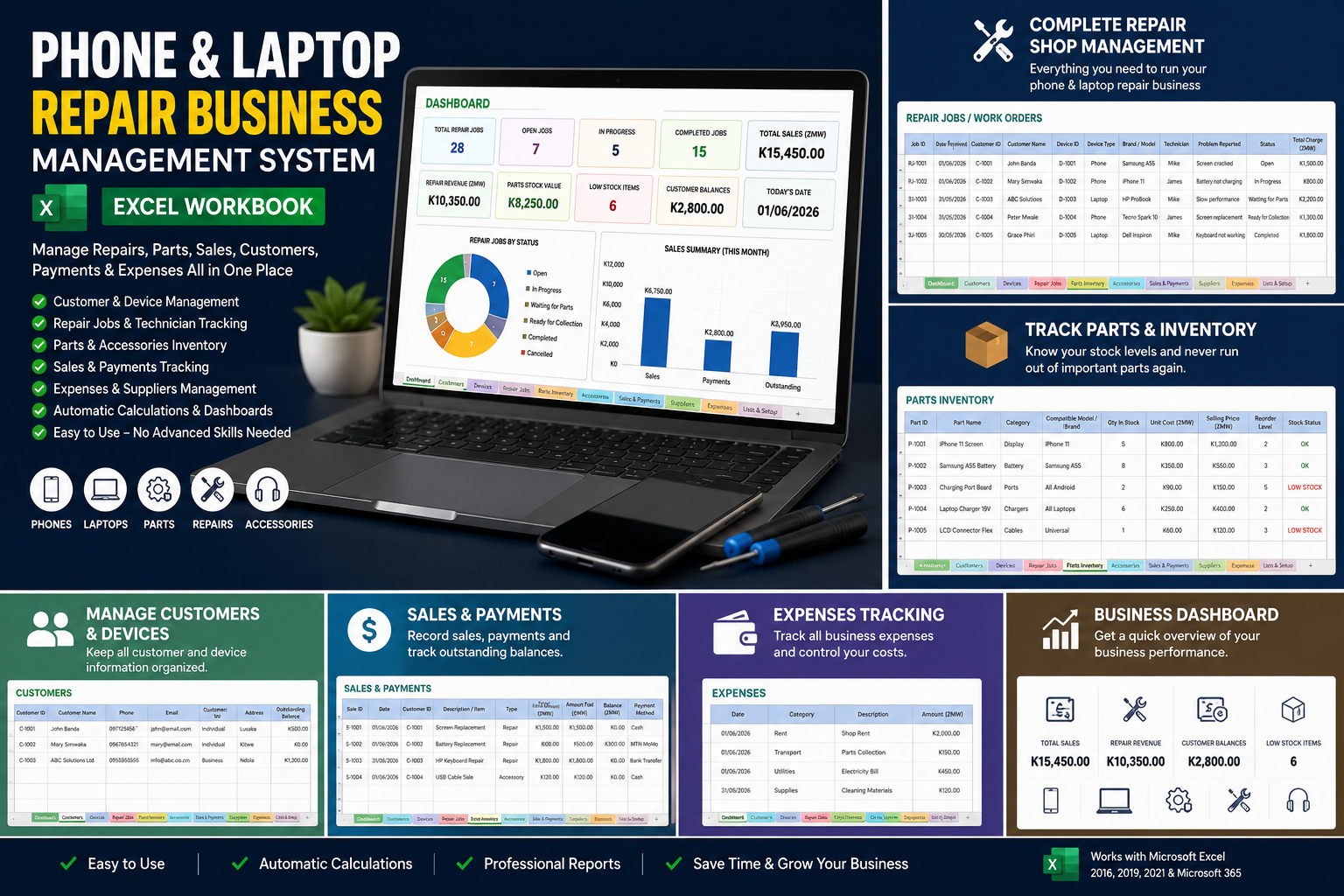
Phone and laptop Repair Business Management System

📱 PHONE & LAPTOP REPAIR BUSINESS MANAGEMENT SYSTEM
Complete Excel Workbook for Phone, Laptop, Parts & Repair Businesses
Run your phone and laptop repair business in a more organized and professional way with this all-in-one Excel Management System.
Whether you repair Android phones, iPhones, laptops, tablets, computers or other electronic devices, this workbook helps you manage customers, devices, repair jobs, spare parts, accessories, sales, payments, suppliers and expenses from one simple Excel file.
🎯 WHAT THIS WORKBOOK HELPS YOU MANAGE
👥 1. Customer Management
Keep a complete record of your customers.
Record:
- Customer ID
- Customer name
- Phone number
- Address
- Customer type
- Outstanding balance
📱 2. Device Register
Record every phone or laptop brought into your shop.
You can capture:
- Device ID
- Customer ID
- Device type
- Brand
- Model
- IMEI / Serial Number
- Colour
- Condition at intake
- Password / lock status
- Additional notes
This makes it easier to identify the customer's exact device and its condition when received.
🔧 3. Repair Job Management
Create a repair record for every device.
Track:
- Job number
- Date received
- Customer
- Device
- Technician
- Customer's reported problem
- Diagnosis
- Parts cost
- Labour charge
- Other charges
- Total repair charge
- Repair status
- Completion date
- Warranty / notes
Repair statuses include:
Open → In Progress → Waiting for Parts → Ready for Collection → Completed → Cancelled
🧩 4. Spare Parts Inventory
Manage your repair parts and know when stock is running low.
Track:
- Part ID
- Part name
- Category
- Compatible brand/model
- Supplier
- Quantity in stock
- Unit cost
- Selling price
- Reorder level
- Automatic stock status
The workbook automatically identifies items as LOW STOCK when they reach or fall below the reorder level.
🎧 5. Accessories Inventory
Manage products such as:
- Phone chargers
- USB cables
- Earphones
- Screen protectors
- Phone cases
- Power adapters
- Laptop chargers
- Mouse and keyboards
- Other accessories
Track quantity, cost, selling price and stock status.
💰 6. Sales & Payments
Record both repair services and product sales.
Track:
- Sale ID
- Date
- Customer
- Repair job
- Item/service
- Payment method
- Amount
- Amount paid
- Outstanding balance
Payment methods include:
- Cash
- Mobile Money
- Bank Transfer
- Card
🚚 7. Supplier Management
Keep supplier information in one place, including:
- Supplier name
- Contact person
- Phone
- Notes
💵 8. Expense Tracking
Record business expenses such as:
- Rent
- Utilities
- Transport
- Tools
- Other operating expenses
📊 9. Business Dashboard
The dashboard gives you a quick overview of your business.
Monitor:
- Total repair jobs
- Open/in-progress jobs
- Completed jobs
- Total sales
- Parts stock value
- Low-stock parts
- Customer balances
- Repair revenue
- Repair jobs by status
🚀 HOW TO USE THE WORKBOOK
STEP 1 — Start with "Lists & Setup"
Open the Lists & Setup sheet.
Review the categories and options already provided.
You can add your own categories if needed.
STEP 2 — Register Your Customers
Open Customers.
Enter each customer on a new row.
Example:
Customer Name Phone Customer Type John Banda 097XXXXXXX Individual ABC Solutions Ltd 096XXXXXXX Business The workbook automatically generates the Customer ID.
STEP 3 — Register the Device
Open Devices.
When a customer brings a phone or laptop for repair, record the device.
Example:
Device Type: Phone
Brand: Samsung
Model: Galaxy A55
IMEI: Customer's IMEI
Condition: Cracked screen
Lock Status: PIN provided
The system automatically generates a Device ID.
⚠️ Important
Always record the device's condition before accepting it for repair.
This helps prevent disputes about scratches, cracks or missing accessories.
STEP 4 — CREATE A REPAIR JOB
Open Repair Jobs.
Create a new row for every repair.
Record:
- Date received
- Customer ID
- Device ID
- Technician
- Problem reported
- Diagnosis
- Parts cost
- Labour
- Other charges
- Status
- Warranty/notes
The Total Charge calculates automatically from:
Parts Cost + Labour + Other Charges
STEP 5 — UPDATE THE REPAIR STATUS
As the technician works on the device, update the status.
Example:
Open
Customer has just brought the device.
↓
In Progress
Technician is working on it.
↓
Waiting for Parts
A replacement part is required.
↓
Ready for Collection
Repair is complete and customer can collect.
↓
Completed
Customer has collected/paid and the job is closed.
STEP 6 — MANAGE SPARE PARTS
Open Parts Inventory.
Enter every part you normally keep in stock.
Example:
Part Compatible Model Qty Cost Selling Price Reorder Level iPhone 11 Screen iPhone 11 5 K800 K1,200 2 Samsung A55 Battery A55 8 K350 K550 3 The workbook automatically shows LOW STOCK when stock reaches the reorder level.
STEP 7 — MANAGE ACCESSORIES
Use Accessories for items you sell separately from repairs.
For example:
- Chargers
- Cables
- Cases
- Screen protectors
- Earphones
- Laptop bags
- Mouse
- Keyboards
Enter the quantity, cost and selling price.
STEP 8 — RECORD SALES AND PAYMENTS
Whenever you receive money, record it in Sales & Payments.
Example:
Repair charge: K1,500
Amount paid: K1,000
Balance: K500
The workbook automatically calculates the outstanding balance.
This helps you keep track of customers who still owe money.
STEP 9 — RECORD BUSINESS EXPENSES
Every business expense should be entered into Expenses.
For example:
Date: 01/09/2026
Category: Transport
Description: Parts collection
Amount: K150
This allows you to monitor your operating expenses.
STEP 10 — CHECK THE DASHBOARD
Return to the Dashboard regularly.
Use it to answer questions such as:
- How many repairs are currently open?
- How many jobs have been completed?
- How much have we sold?
- How much money is outstanding?
- How much stock do we have?
- Which parts need to be reordered?
- How much revenue is coming from repairs?
💡 RECOMMENDED DAILY WORKFLOW
MORNING
Check:
Dashboard → Open Repairs → Waiting for Parts → Low Stock
WHEN A CUSTOMER ARRIVES
Customer → Device → Repair Job
WHEN REPAIR STARTS
Change status to:
In Progress
WHEN PARTS ARE REQUIRED
Update:
Parts Inventory
and change the repair status to:
Waiting for Parts
WHEN REPAIR IS FINISHED
Change status to:
Ready for Collection
WHEN CUSTOMER PAYS
Record payment under:
Sales & Payments
END OF DAY
Review:
Sales → Payments → Expenses → Repairs → Dashboard
🔐 IMPORTANT DATA MANAGEMENT TIPS
- Make a backup of the workbook regularly.
- Do not delete completed repair records.
- Always record the IMEI/serial number where applicable.
- Record the device condition before repair.
- Keep customer payment records updated.
- Update parts stock whenever parts are purchased or used.
- Protect sensitive customer information.
- Use a separate copy for each business/location if you operate multiple branches.
👨🔧 WHO CAN USE THIS SYSTEM?
This workbook is suitable for:
✅ Phone repair shops
✅ Laptop repair shops
✅ Electronics repair businesses
✅ Computer shops
✅ Mobile phone shops
✅ IT repair businesses
✅ Freelance technicians
✅ Electronics retailers with repair services
✅ Small repair workshops
✅ Businesses selling phone/laptop accessories
⭐ KEY BENEFITS
Organize your repairs.
Know where every device is.
Track your spare parts.
Know who owes you money.
Monitor your sales.
Control your expenses.
Reduce lost repair jobs.
Run your repair shop more professionally.
📦 WHAT YOU RECEIVE
1 Excel Workbook
Containing:
- Dashboard
- Customers
- Devices
- Repair Jobs
- Parts Inventory
- Accessories
- Sales & Payments
- Suppliers
- Expenses
- Lists & Setup
Designed for use with Microsoft Excel.
Currency
Default currency: ZMW (Zambian Kwacha).
📌 PRODUCT NOTE
This is a business management workbook, not accounting software or a replacement for a full POS/ERP system.
It is designed to give small and growing repair businesses a practical, affordable way to organize their daily operations using Microsoft Excel.