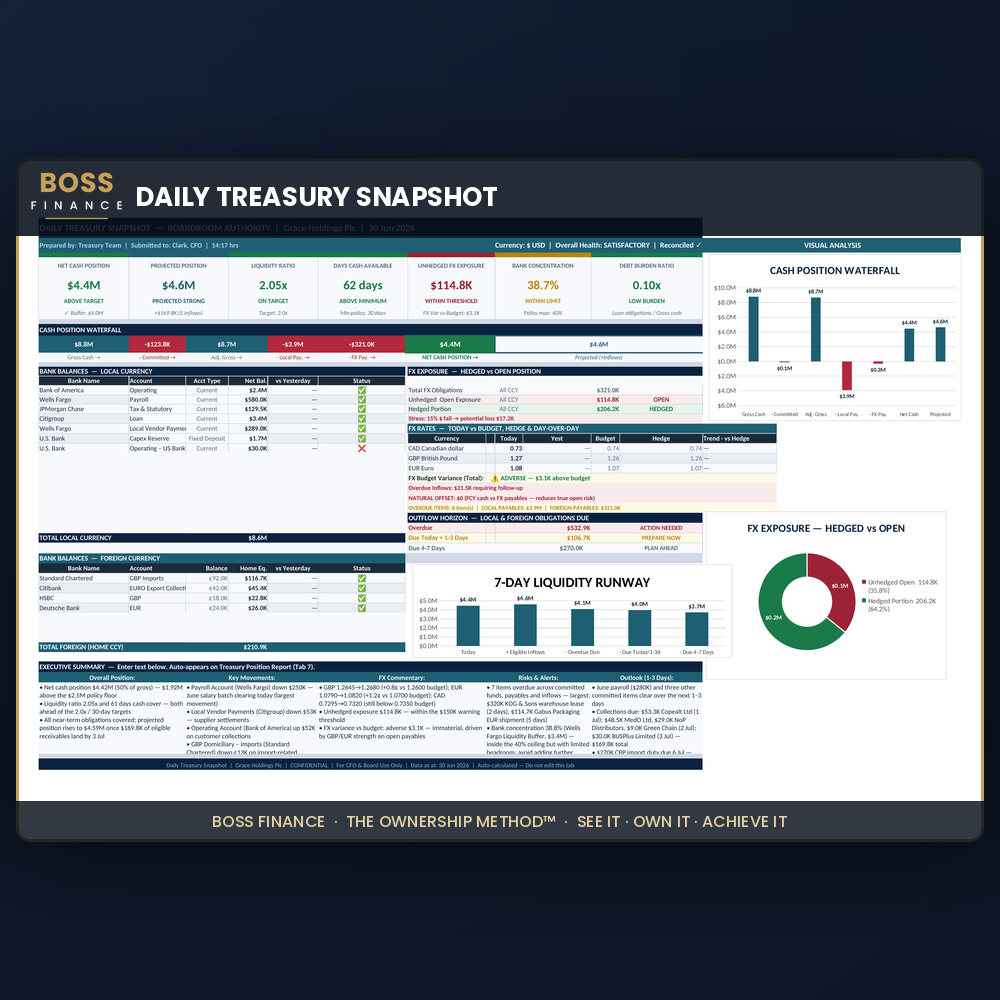
Daily Treasury Snapshot™ — Cash Position & Treasury Report Template (Excel, Multi-Currency)
Your daily cash report should take 10 minutes, not 90
If you're a Finance Manager, Treasurer, Accountant, Controller or CFO, you already know the numbers aren't the hard part. Pulling balances, netting off committed funds, checking FX rates, etc — that's routine. The 45 to 90 minutes it takes to turn all of that into something your CFO or board will actually read is the part that eats your morning.
The Daily Treasury Snapshot Template™ replaces that grind with a fixed 10-minute workflow. Five short input tabs in and automatically: A complete five-level cash position out — Gross Cash, Adjusted Gross, Intermediate Net, Net Cash Position, Projected Cash Position. A live visual dashboard with runway, FX exposure and treasury health. And a CFO/board-ready Treasury Position Report that exports to PDF in one click.
Every number is a live formula. Every figure is traceable back to your input. Built-in integrity checks flag a broken formula chain before it ever reaches your CFO.
Built on 15 years of treasury and CFO-advisory experience. Macro-free Excel. Runs on any version of Excel 2016 or newer, Windows or Mac. No IT support, no subscription.
Launch pricing is currently reduced — available for a limited time only.
What's inside:
- A pre-built SETUP tab — configure once for up to 50 bank accounts and more, your base currency, FX pairs, ageing ranges and expense headings
- 5 daily input tabs (Balances & FX · Committed Funds · Local Payables · Foreign Payables · Expected Inflows)
- A CFO/board-ready Treasury Position Report automatically done — exports straight to PDF for your CFO in one click
- A visual Dashboard with a 7-day liquidity runway, FX exposure donut, cash position waterfall, and a one-glance Overall Treasury Health indicator
- Multi-currency support out of the box — track local and foreign accounts side by side, with automatic FX conversion
- Built-in integrity checks — a red flag tells you instantly if a formula chain breaks, before you ever send a wrong number to your CFO
- A 28-page illustrated User Guide (PDF) — first-time setup, the full daily 8-step workflow, screen-by-screen reference, troubleshooting and FAQs
Built on The Ownership Method™ — See It · Own It · Achieve It. You see your true cash position in minutes, you own the number with full confidence in every formula behind it, and you achieve the board-ready report without the 90-minute grind.
Who this is for: Finance Managers, Treasurers, Accountants, Financial Controllers and CFOs at mid-sized companies — any sector, any country. No IT support. No macros to enable.
What you get on purchase:
- 1 macro-free Excel workbook (.xlsx)
- 1 full Video workthrough guide
- 1 complete 28-page PDF User Guide
- Single-company licence, use on up to 3 devices
Professional reporting tool — not financial advice. Accuracy depends on the data you enter; always verify balances and rates against your primary bank sources.
Bullet-Point Feature List
- ✅ 5-level cash position hierarchy, fully automated
- ✅ Multi-currency — unlimited FX pairs, automatic conversion
- ✅ Up to 50 bank accounts, pre-built and ready
- ✅ One-click board-ready PDF export for your CFO
- ✅ Visual Dashboard with 7-day liquidity runway
- ✅ Built-in error/integrity checks — never send a broken number
- ✅ Macro-free — works in Excel 2016 through 365, Windows or Mac
- ✅ 28-page PDF User Guide included
- ✅ Setup takes under 30 minutes; daily use takes 10–15 minutes
FAQ Block
Q: Do I need treasury software or IT support to use this?
No. It's a standard Excel file. If you can type a number into a cell, you can run this.
Q: Does it work on Mac / Excel Online / older Excel versions?
Yes — Excel 2016 and newer (Windows or Mac), and Excel Online. It does not work in Google Sheets.
Q: Can I use this for more than one company?
Each licence covers one company. If you manage multiple entities, purchase a copy per company — this keeps the single-company formula architecture intact.
Q: How many bank accounts can I track?
Up to 50, pre-configured. Instructions for adding beyond the default display are included in the guide.
Q: Is this a subscription?
No. One-time purchase, yours forever, use it daily with no recurring cost.
Q: Excel showed a yellow "Protected View" warning when I opened the file — is this safe?
Yes. This is a standard Windows/Excel notice shown for any file downloaded from the internet — it appears regardless of what's inside the file. Click Enable Editing in that yellow bar and the workbook opens normally. You'll only see this once per file.
Tags: treasury report template, cash position excel, multi-currency treasury, daily treasury report, CFO excel tools,finance manager, treasurer, financial controller, multi-currency, FX, liquidity, dashboard, board report