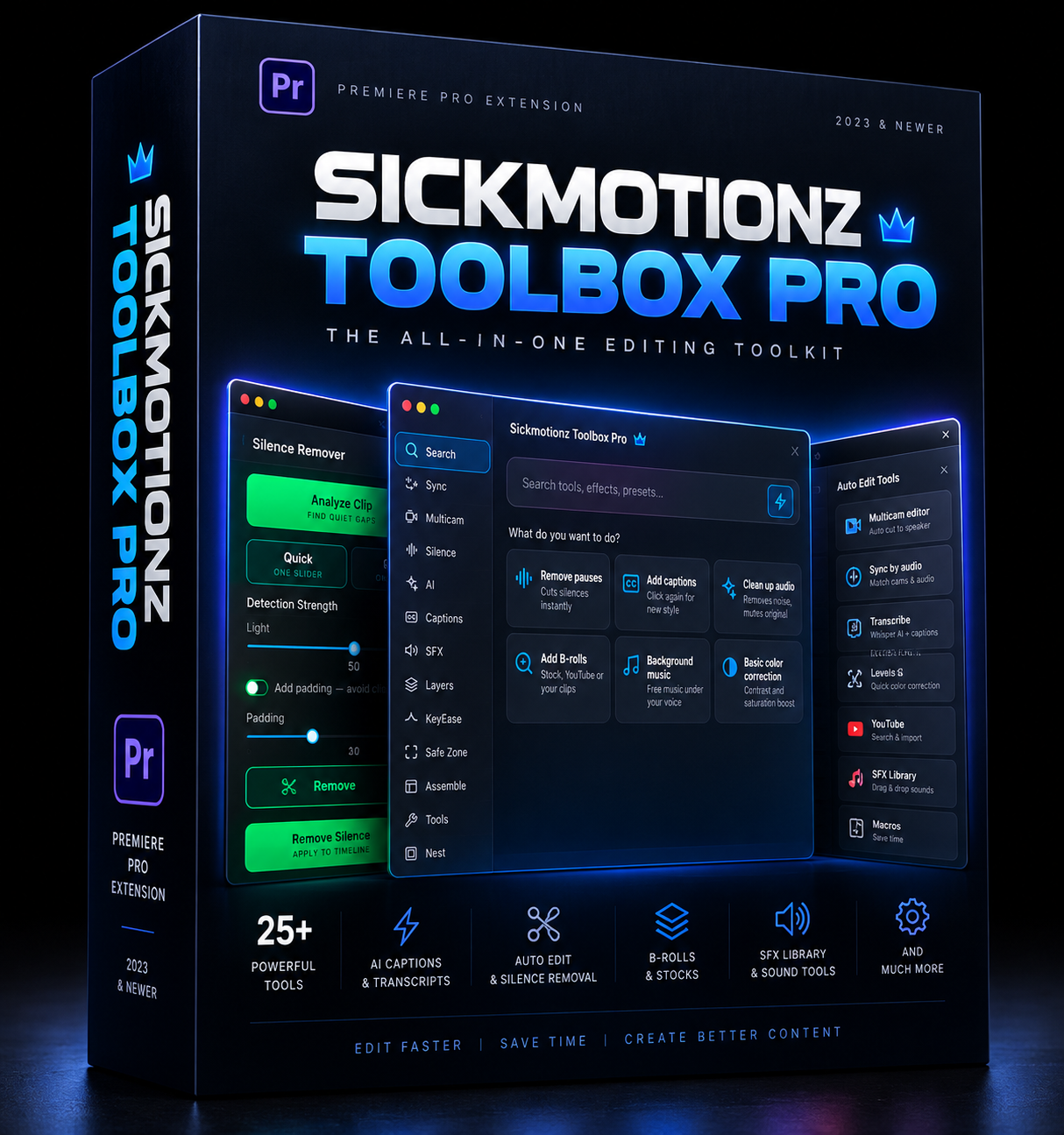
SickMotionz ToolBox Pro
🚀 SICKMOTIONZ TOOLBOX PRO
25+ editing tools in one Premiere Pro panel.
Stop jumping between plugins, websites and menus. Toolbox Pro puts the jobs you do every day into one clean panel inside Premiere Pro: cutting silences, captions, b-roll, music, audio cleanup, keyframes, exports and more. Most of them take one click.
Built by an editor, for editors who'd rather create than click.
⏱️ HOW FAST?
Run one macro and a 1-minute talking-head video goes from raw clip to fully edited (silences and retakes cut, audio cleaned, color, captions, b-roll and music) in about 3 minutes. Leave it running and it can edit up to 300–500 videos in 24 hours, all from one 1-click macro or a single voice command.
(Times depend on your computer and internet speed. Rendering the final export is extra.)
⚠️ Works only with Premiere Pro 2025 and newer (Mac and Windows). It won't install or run on Premiere 2024 or older.
⚡ ONE-CLICK WORKFLOWS
• Home cards: Remove pauses, Add captions, Clean up audio, Add B-rolls, Background music, Basic color correction. Click once and it's done.
• Macros: run a whole edit hands-free, about 3 minutes per 1-minute video. One-click workflows like "1-Click Talking Head", "Remove Silences + Captions" and "Auto B-Roll", plus a builder to chain any tools into your own macro.
• Quick Slots: put your favourite effects, presets and tools on number keys 1–0.
• Search: find and apply any effect, transition or preset by typing its name.
🎙️ VOICE COMMANDS (BETA)
Tap the mic and talk: "remove the pauses", "add captions", "add 5 b-rolls, 2 seconds each", "apply the fast zoom in preset", "export it for YouTube".
Say "edit my videos" and it edits each talking-head video for you: removes silences and retakes, cleans the audio, adds color, captions, b-roll and music, then asks if you want to export. Your voice is processed on your computer and never uploaded.
✂️ CUT FASTER
• Silence Remover: finds and removes dead air, with a one-slider Quick mode or a Manual mode, and can alternate clips on V1/V2 for jump-cut edits.
• Retake remover: catches sentences you started over and keeps the best take.
• Trim tools: trim video to audio, trim head or tail, cut before or after the playhead.
• Close Gaps, Offset Clips, Nest / Unnest, Assemble (build a sequence from your marked moments).
💬 CAPTIONS AND TEXT
• AI transcription on your computer: no subscription, no upload.
• Animated caption styles: word-by-word build-up, size and position controls, preview on your own frame.
• Fix words and remove filler words (um, uh) before captioning.
• Translate captions into other languages, offline.
• Export SRT files.
• Multicam captions by speaker, each speaker in their own style.
🎬 B-ROLL, MUSIC AND STOCK
• Smart b-roll: reads what you say and places matching footage from Pexels and Pixabay, YouTube, or your own clips. You choose how many and how long.
• Background music: finds royalty-free tracks and sets them at the right level under your voice.
• Stocks tab: search free photos, videos and icons.
• YouTube tab: search, preview, trim and download straight to your timeline.
• 700k+ online sound effects, plus your own SFX library.
🔊 AUDIO
• Remove background noise on your computer, no upload.
• Pro cleanup with Auphonic (needs your own Auphonic key).
• Loudness fix for YouTube, Podcast, TV or TikTok/Instagram in one click.
• Sound design: drops SFX on your markers automatically (whoosh, impact, pop…).
• Convert audio to MP3, WAV, AAC, FLAC or OGG.
🎥 MULTICAM AND SYNC
• Sync by audio: lines up cameras and mics automatically.
• Auto multicam: switches angles to whoever is talking, with wide shots when people talk over each other.
✨ LOOK AND MOTION
• KeyEase: ease, bounce, spring, elastic and stepped keyframes, with presets, your own curves and Reverse animation.
• Layers: adjustment layers and color mattes in one click, plus saved effect stacks.
• Every blend mode one click away, plus overlays (16:9 and 9:16) and 270+ MOGRTs (captions, titles, bounce presets and templates), with room for your own.
• Safe zone guides for TikTok, Reels and Shorts.
• Color labels, with one-click randomize.
📦 ORGANIZE AND EXPORT
• Export Wizard and 1-Click Batch Export of every sequence.
• Import sequences from other projects.
• Organize bins, Save Still, Copy / Paste Motion, Fill Frame, Reset Clip, Paste Image.
• Storage manager: see and clean up everything the panel downloaded.
🧾 GOOD TO KNOW
• Presets with eased keyframes: Premiere's scripting doesn't let extensions apply presets with their easing curves, so keyframes from those presets land without the ease. Fix: apply the preset, select the keyframes, and use KeyEase to add the ease back in one click.
• Undoing big cuts: Premiere can't undo the silence and retake cuts in one Cmd/Ctrl+Z step, so the panel saves a backup copy of your sequence before every cut.
• Caption text in Essential Graphics: a known Adobe bug makes the Essential Graphics panel show the template's original title, but your captions show the right words on screen.
• Voice commands are in beta: they work best in a quiet room. If your setup is noisy, Macros give you the same automation in one click.
• Smart b-roll is matched by keywords, so now and then a clip may not fit perfectly. Swap it in a click.
• First run: some parts download once (speech engine, MOGRT and background packs, about 2 GB if you take everything). After that, most tools work offline.
• Your own keys and your own use: Auphonic and remove.bg need your own free or paid key. Use YouTube downloads only for content you have the right to use.
✅ WHAT YOU GET
• SickMotionz Toolbox Pro for Mac and Windows (Premiere Pro 2025+)
• Step-by-step install guide, a voice command guide and tutorial videos for every tab
• WhatsApp support from me, SickMotionz
Edit faster. Create more. 🔥