THE COMPLETE DOODLE EXPLAINER VIDEO WORKFLOW
THE COMPLETE DOODLE EXPLAINER VIDEO WORKFLOW
Learn how to create professional doodle-style explainer videos from SCRATCH to FINISH — even if you don't know where to start.
What if you had a complete system that showed you exactly how to take an idea and turn it into a fully produced, engaging doodle explainer video?
From researching and writing the script…
To planning your visuals…
To generating consistent scenes and images…
To creating the voiceover…
To editing everything together…
To designing the thumbnail…
That's exactly what you'll get inside this complete workflow.
This isn't just a collection of random prompts or AI tools.
It's the full production workflow I use to create doodle-style explainer videos, broken down into practical steps you can follow from beginning to end.
🎬 WHAT YOU'LL LEARN
Inside this workflow, you'll learn how to build your videos step-by-step:
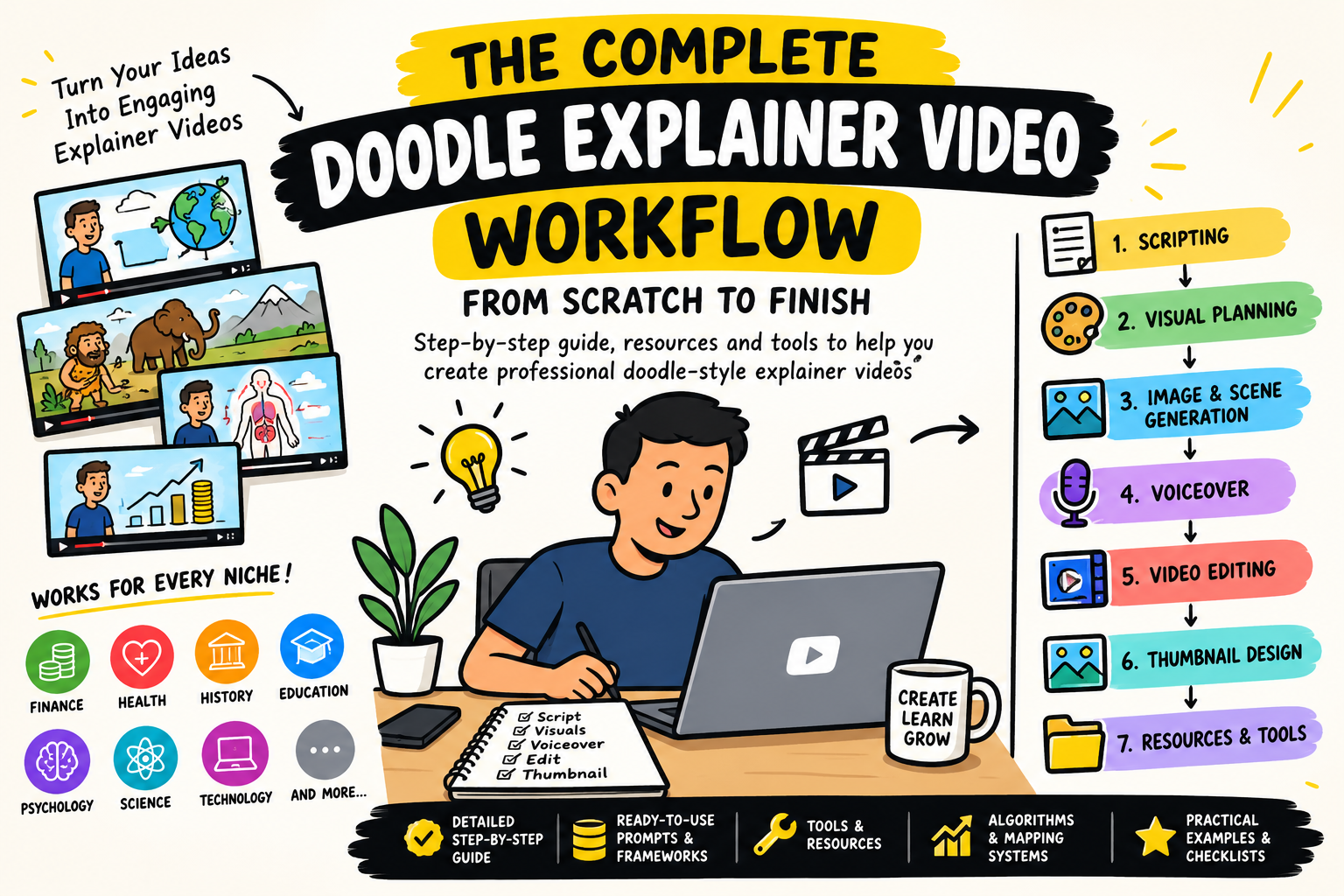
1. SCRIPTING & CONTENT DEVELOPMENT
Learn how to turn a simple idea into an engaging explainer video script.
2. VISUAL PLANNING & SCENE BREAKDOWN
Learn how to take your script and transform it into individual visual scenes.
You'll learn how to determine:
- What should appear on screen
- Which parts need illustrations
- How to visualize abstract concepts
- Where characters should appear
- How to structure scenes
- How to synchronize visuals with narration
- How to maintain visual continuity throughout the video
You'll be able to look at a script and know exactly what needs to be shown on screen.
3. DOODLE IMAGE & SCENE GENERATION
This is where your script starts becoming a visual video.
You'll get the prompting workflow used to generate the doodle-style illustrations and scenes for your videos.
And most importantly…
CONSISTENCY.
You'll learn how to keep recurring characters, clothing, facial features, environments, proportions and other visual elements consistent across multiple scenes.
No more having the same character look completely different from one scene to another.
4. AI PROMPTING SYSTEM
You'll get the actual prompting resources and frameworks used throughout the workflow.
Including prompts for:
- Script development
- Scene generation
- Character consistency
- Visual storytelling
- Image generation
- Scene planning
- Thumbnail creation
- Other parts of the production process
Instead of staring at a blank AI chat wondering:
"What prompt should I use?"
You'll have a structured system to follow.
5. VOICEOVER CREATION
Learn how to turn your finished script into a professional-sounding voiceover.
You'll learn the workflow for:
- Preparing your script for narration
- Generating the voice
- Matching narration with your scenes
- Creating natural pacing
- Structuring your audio for editing
6. VIDEO EDITING
Once you have your script, visuals and voiceover, you'll learn how to bring everything together.
You'll learn the workflow for:
- Importing and organizing your assets
- Syncing visuals with narration
- Timing scenes
- Adding sound effects
- Adding background music
- Improving pacing
- Producing the final video
So you can go from a folder full of images and audio files to a complete finished explainer video.
7. THUMBNAIL DESIGN
Your video can be amazing…
But if nobody clicks, it doesn't matter.
You'll also learn the workflow for creating thumbnails designed specifically for explainer content.
You'll learn how to approach:
- Thumbnail concepts
- Click-worthy thumbnail layouts
🧠 YOU'LL ALSO GET THE RESOURCES
This isn't just theory.
You'll get the resources, frameworks and tools needed to actually implement the workflow.
Depending on the section, you'll get resources such as:
✅ Ready-to-use prompts
✅ Prompt frameworks
✅ Script structures
✅ Visual planning systems
✅ Scene-generation workflows
✅ Character consistency frameworks
✅ Algorithms/mapping systems
✅ Tool recommendations
✅ Production checklists
✅ Thumbnail workflows
✅ Video production resources
✅ And other supporting resources used throughout the process
Everything is organized around the actual process of creating the video, rather than giving you a random list of tools to figure out yourself.
🌎 YOU ARE NOT LIMITED TO ONE NICHE
One of the biggest advantages of this workflow is that doodle-style explainer videos can work across multiple niches.
You can adapt the system to create content in:
💰 FINANCE
Explain investing, money, economics, business, personal finance and financial concepts through simple visual storytelling.
🧬 HEALTH
Break down health, biology, human anatomy, nutrition and medical concepts using easy-to-understand illustrations.
🏺 HISTORY
Explain ancient civilizations, historical events, human evolution, archaeology and historical mysteries through engaging visuals.
🎓 EDUCATION
Turn complicated educational concepts into simple, visual explanations.
🧠 PSYCHOLOGY
Explain human behavior, psychology, relationships, cognitive biases and fascinating human behaviors.
🔬 SCIENCE
Break down physics, chemistry, biology, space, evolution and other scientific topics.
💻 TECHNOLOGY
Explain AI, software, technology, programming concepts and emerging technologies.
🌍 AND MANY MORE
The workflow can be adapted to almost any niche where information needs to be explained visually.
If the content can be explained through stories, diagrams, characters, illustrations and visual examples, this workflow can be applied.
🚀 WHO IS THIS FOR?
This workflow is for:
YouTubers who want to create explainer content.
Faceless channel creators looking for a repeatable video production system.
Beginners who don't know how all the different pieces fit together.
Content creators who want to use AI to speed up their production process.
Educators who want to turn complicated concepts into engaging visual content.
Researchers & storytellers who want to explain complex subjects simply.
Entrepreneurs & brands who want to create educational video content.
And anyone who wants to build a channel around explainer-style content.
❌ THIS IS NOT JUST A PROMPT PACK
There are plenty of places where you can find hundreds of AI prompts.
That's not what this product is about.
The real problem isn't:
"Where can I find another prompt?"
The problem is:
"How do I take an idea and actually turn it into a finished video?"
That's what this workflow solves.
You'll see how the different parts connect:
IDEA → RESEARCH → SCRIPT → VISUAL PLAN → SCENES → IMAGES → VOICEOVER → EDITING → THUMBNAIL → FINISHED VIDEO
Instead of trying to figure everything out separately, you'll have a complete production pipeline.
🎯 THE GOAL
By the end of this workflow, you should understand how the entire production process works.
You'll know what to do when you have:
An idea but no script.
A script but no visuals.
Visuals but no idea how to structure the scenes.
Images but no idea how to turn them into a video.
A finished video but no idea how to create the thumbnail.
The workflow connects all of these steps into one system.
📦 WHAT YOU'RE GETTING
Inside the product, you'll get access to the complete Doodle Explainer Video Production Workflow, covering:
✔️ Scripting
✔️ Content structure
✔️ Visual planning
✔️ Scene breakdown
✔️ Doodle image generation
✔️ Character consistency
✔️ Prompt engineering
✔️ Voiceover creation
✔️ Video editing
✔️ Thumbnail creation
✔️ Tools & resources
✔️ Algorithm/mapping frameworks
✔️ Production systems
✔️ Practical prompts
✔️ Checklists & supporting resources
All designed to take you from ZERO → FINISHED VIDEO.
🔥 STOP TRYING TO FIGURE IT ALL OUT SEPARATELY
You don't need to learn ten completely unrelated systems and hope they somehow fit together.
You need a workflow.
A repeatable process you can use every time you want to create another video.
Learn the system once.
Adapt it to your niche.
Use it to create video after video.
Whether you're building a channel around finance, health, history, education, science, psychology, technology, or another explainer niche, the same core production system can be adapted to your content.
Your next explainer video can start with just one idea.
The workflow shows you what to do next.