FrameForge
FRAMEFORGE v1.7.1
Create. Animate. Faster.
Professional Motion Design & Flyer Animation Extension for Adobe After Effects
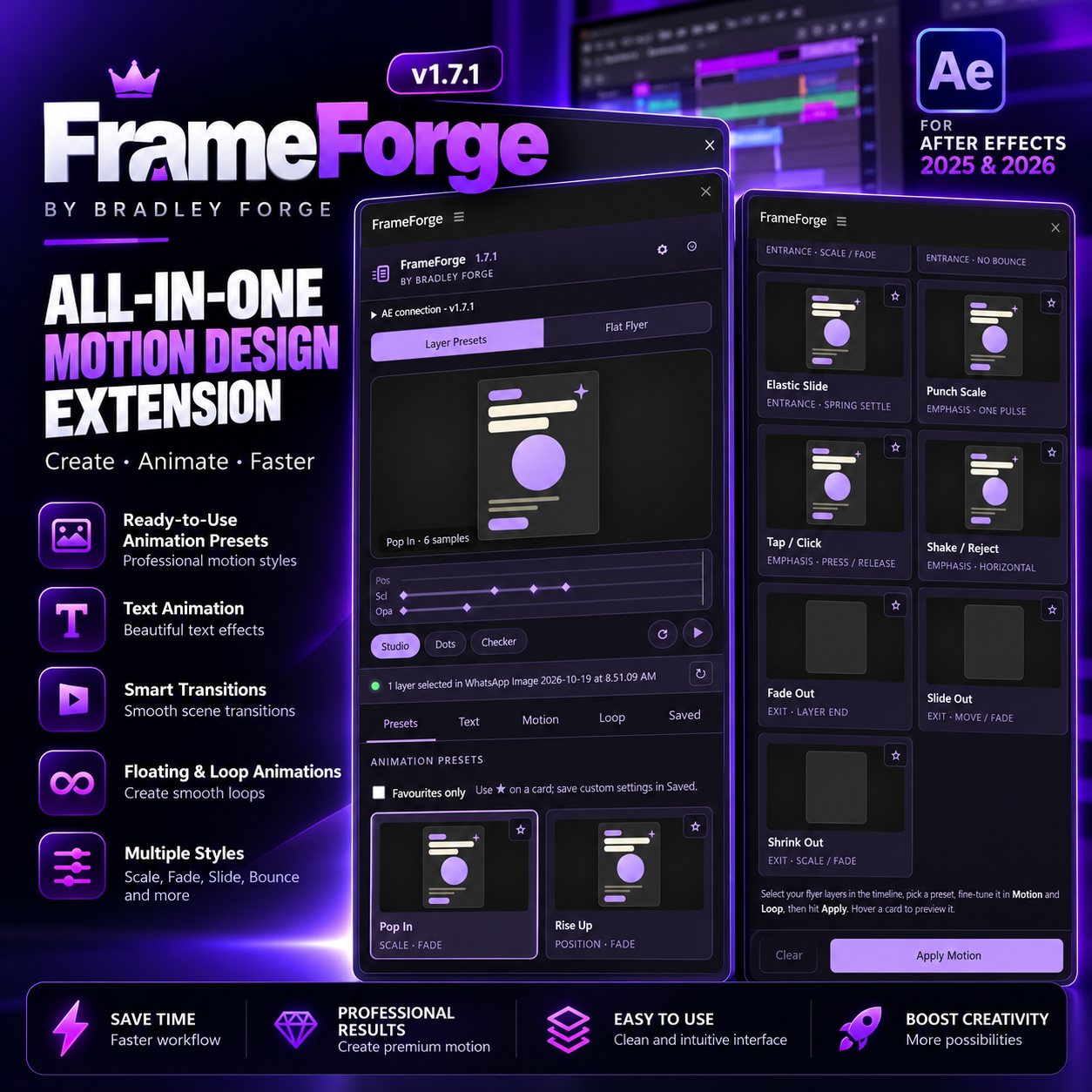
Transform static designs into stunning animations and create professional motion graphics faster with FrameForge, an all-in-one motion design extension developed by Bradley Forge.
Designed for motion designers, graphic designers, video editors, freelancers, and content creators, FrameForge simplifies animation with powerful presets, cinematic transitions, and customizable motion controls.
KEY FEATURES:
🎬 15 Animation Presets
Create smooth entrance, exit, and emphasis animations, including Pop In, Rise Up, Bounce, Slide, Fade, Zoom, and more.
🖼️ Advanced Flyer Animation
Transform static JPG/PNG flyers into engaging animated videos with camera movements, zoom effects, and up to six customizable focus areas.
🎥 27 Cinematic Transitions
Create smooth transitions using Whip Pan, Zoom Rush, Dissolve, Light Leak, Film Burn, and other professional effects.
✨ Text Animation
Animate editable text using Typewriter, Word Rise, Character Fade, Word Pop, and Line Slide effects.
🎯 Smart Focus Motion
Highlight important areas of your designs using cinematic zooms, floating effects, camera movement, and customizable timing.
🔄 Floating & Loop Effects
Add continuous floating, swaying, pulsing, and looping animations to your designs.
⚙️ Advanced Motion Controls
Customize animation speed, easing, direction, scale, opacity, bounce, and movement intensity.
💾 Save Custom Presets
Save your favorite animation configurations and reuse them across projects.
🎨 6 Premium UI Themes
Enjoy a sleek, dockable interface with six customizable color themes, including Forge Purple.
💡WHAT CAN YOU CREATE?
✅ Animated promotional flyers and posters
✅ Product advertisements and marketing videos
✅ Instagram Reels, TikTok videos & YouTube Shorts
✅ Professional text and typography animations
✅ Business and brand promotional videos
✅ UI and SaaS motion graphics
✅ Cinematic flyer presentations
✅ Floating and looping animations
⚡HOW IT WORKS
For Layer Animation:
Select your After Effects layers → Choose an animation preset → Customize settings → Click Apply Motion.
For Flyer Animation:
Import your flyer → Load it into FrameForge → Select focus areas → Customize camera movements and transitions → Generate your animated composition.
No coding knowledge required!
💻 COMPATIBILITY
- Software: Adobe After Effects
- Target Versions: 2025 & 2026
- Extension Version: FrameForge v1.7.1
- Format: Digitally Signed ZXP / CEP
- Operating System: Windows
- Mac: Installation instructions included
📦 WHAT'S INCLUDED?
✅ FrameForge v1.7.1 Extension (ZXP)
✅ Windows & Mac Installation Guide (PDF)
✅ Complete User Guide with Real UI Screenshots (PDF)
✅ Manual Installation Files
✅ ZXP Installer Download Instructions
✅ Customer Support & Contact Information
🌟 WHY FRAMEFORGE?
✔ Save time on repetitive animation tasks.
✔ Create professional animations with less manual work.
✔ Transform static flyers into engaging motion graphics.
✔ Customize animations to suit your creative style.
✔ Enjoy an intuitive, beginner-friendly interface.
✔ Access multiple animation tools in one extension.
📞 SUPPORT & CONTACT
📧 Email: [email protected]
💬 WhatsApp: +234 911 564 2009
📸 Instagram: @bradleyforge
🎵 TikTok: @bradleyforge
🚀 BRING YOUR DESIGNS TO LIFE!
Create impressive animations, simplify your workflow, and unlock more creative possibilities with FrameForge v1.7.1.
🟣 GET FRAMEFORGE TODAY!