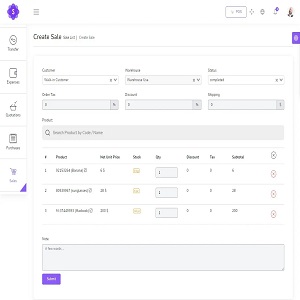
POS Management and Inventory System Project in PHP and MySQL with Source Code

POS Management and Inventory System Project in PHP and MySQL with Source Code
POS Management and Inventory System Project in PHP MySQL enables you to manage inventory,
sales, purchases, customers, invoices, receiving payments, and more. It will also allow you to make
purchases and sales from anywhere, anytime. Whether you run a small business or a large company
It’s the solution you need to manage inventory, purchases and sales – all in one app.
DOWNLOAD THIS FOR PREVIEW
FOR INSTALLATION WHATSAPP +2348054240542
THIS SCRIPT WORKD FOR BOTH ONLINE AND OFFLINE
(FOR INSTALLATION WHATSAPP +2348054240542)
Online POS Management and Inventory System Features
These are the following features of Online POS Management and Inventory System in PHP MySQL:
- Easy POS and Dynamic dashboard
- Items , Adjustment , Transfer
- Quotations , Sales , Purchases
- Returns Customer & Supplier
- Users ,Customers, Supppliers
- Currency , Units , Category , Backup
- Payment Sales , Purchases
- Payments Report
- Overview & warehouse stock charts
- Purchases & Sales report
- Customers & suppliers reports
- Product quantity alerts
- Mail notification system addedd
- Uses Structured And Customizable Sass Code
- Integrated With Vuex,Vue Router
- Dark Version Included
- Multilingual 14 languages and More Will be added soon
- RTL Support Adeed
- Pure Vue Js ,No JQuery
- Clean And Organized Code
- Well Documented Code
- Standard Folder Stucture
- Easy POS and Dynamic dashboard
- and Many More..
Script Comes With
- Excellent support with a fast response rate.
- Fix any bugs or broken content.
- Help get you setup and installed!
- Secure Database that uses prepared statements so no SQL Injection!
- Protects against CSRF attacks!
- HTML Filter to protect against XSS attacks!
- Built using the latest Strong LARAVEL Framework.
Server Requirements
These are the following server requirements of Online POS Management and Inventory System:
- PHP >= 7.3.0
- Mysql 5.x or higher
- BCMath PHP Extension
- Ctype PHP Extension
- Fileinfo PHP Extension
- GD2 PHP Extension
- JSON PHP Extension
- Mbstring PHP Extension
- OpenSSL PHP Extension
- PDO PHP Extension
- Tokenizer PHP Extension
- XML PHP Extension
POS Management and Inventory System Installation
Installation in Server
These are the steps on how to install POS Management and Inventory System in Server:
If you would like to edit a specific section of the site, simply find the appropriate label in the CSS file, and then scroll down until you find the appropriate style that needs to be edited.
jQuery and JavaScript
- jQuery
- Bootstrap (bootstrap.min.js)
- gmap (gmaps.js)
- Highlight (highlight.min.js)
- Isotope(Isotope.pkgd.min.js)
- Jquery UI(jquery-ui-slider.min.js)
- Circliful(jquery.circliful.js)
- Counterup (jquery.counterup.min.js)
- Ripple (jquery.ripples-min.js)
- Slicknav(jquery.slicknav.min.js)
- Tubular(jquery.tubular.1.0.js)
- Lightcase (lightcase.js)
- Map Script (map-script.js)
- Particles (particles.min.js)
- Raindrops (Raindrops.js)
- Slick (slick.min.js)
- Swiper (swiper.min.js)
- All Plugin Activation File (main.js)
- jQuery is a Javascript library that greatly reduces the amount of code that you must write.
- Most of the animation in this site is carried out from the customs scripts. There are a few functions worth looking over.
In addition to the custom scripts, I have implemented few “tried and true” plugins to create the effects. This plugin is packed, so you won’t need to manually edit anything in the file. The only necessary thing to know is how to call the method.
POS Management and Inventory System Modules
These are the modules of POS Management and Inventory System:
POS Printer Settings
Guide to Setting Up Receipt Printer to work with POS Small Receipts
To set up receipt printer do the following:
1) If printer is not already installed, follow manufacturer instructions to set up the printer and install the software.
2) Go to settings for your printer in your operating system.
Note: The next instructions are for Windows 10 printer settings.
- Go to your Start Menu and click the Settings icon.
- Go to Devices, then Printers and Scanners. This is your printer settings.
- Once in your printer settings, find the receipt printer. Click the printer icon.
- Next click Manage, then click Printer Properties.
- Click the Advanced Tab.
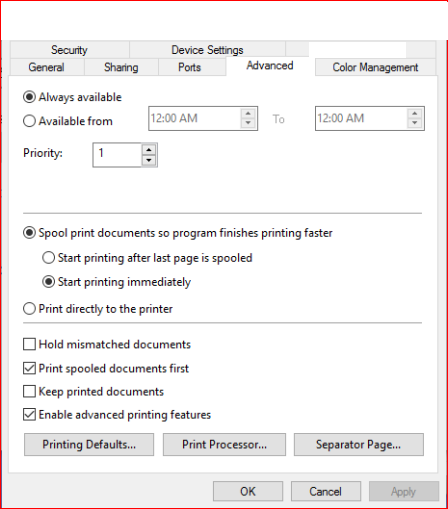
- Click Printing Defaults.
- In the lower right corner of the Printing Defaults screen, click Advanced


The setup of the receipt printer is complete. It should properly print small receipts.
Note: These instructions are for Windows 10. If you are using an earlier version of Windows the settings should be similar. If you are using another operating system, find your printer size, find where to set the paper size and set it to 72mm x 200mm.
Print barcode/labels
Go to /app/products/barcode
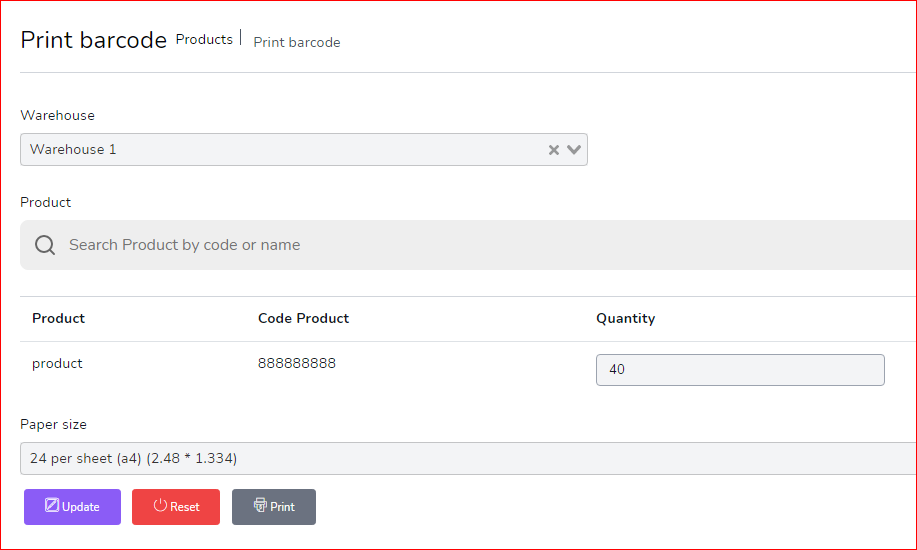
1) select warehouse
2) select Product
3) Set quantity
4) choose Paper size
5) click on Update
5) click on Print

Login
login by default
Email : [email protected]
Password : 123456
you can change password for security purpose
Dashboard
Dynamic dashboard
- Today Sales
- Today Income
- Today Expenses
- Today Profit
- This Week Sales & Purchases
- Top Selling Products This Month
- Payment Sent & Received This Week
- Top 5 Customers This Month
- Recent Sales
 pos management with inventory system
Products
to create a new product it’s very easy
- Product Name (required)
- Product Code (required)
- Category (required)
- Brand (optional)
- Barcode Symbology (required)
- Product Cost (required)
- Product Price (required)
- Product Unit (required)
- Sale Unit (required)
- Purchase Unit (required)
- Stock Alert (optional)
- Order Tax (optional)
- Tax Method (optional)
- Note (optional)
- you can add multiple product image
- you can add multiple variant of product

you can manage product list
- Edit Product
- View Details Product
- Delete Product
- Generate Product list in PDF
- Generate Product list in Excel
- Filter product by code , name , category , name

Transfers
to create a new Transfer it’s very easy
- From Warehouse (required)
- To Warehouse (required)
- You can manage Transfer list
- Edit Transfer
- View Details Transfer
- Delete Transfer
- Generate Transfer list in PDF
- Generate Transfer list in Excel
- Filter Transfer by Reference , To warehouse , From Warehouse , Status
- Status (required)
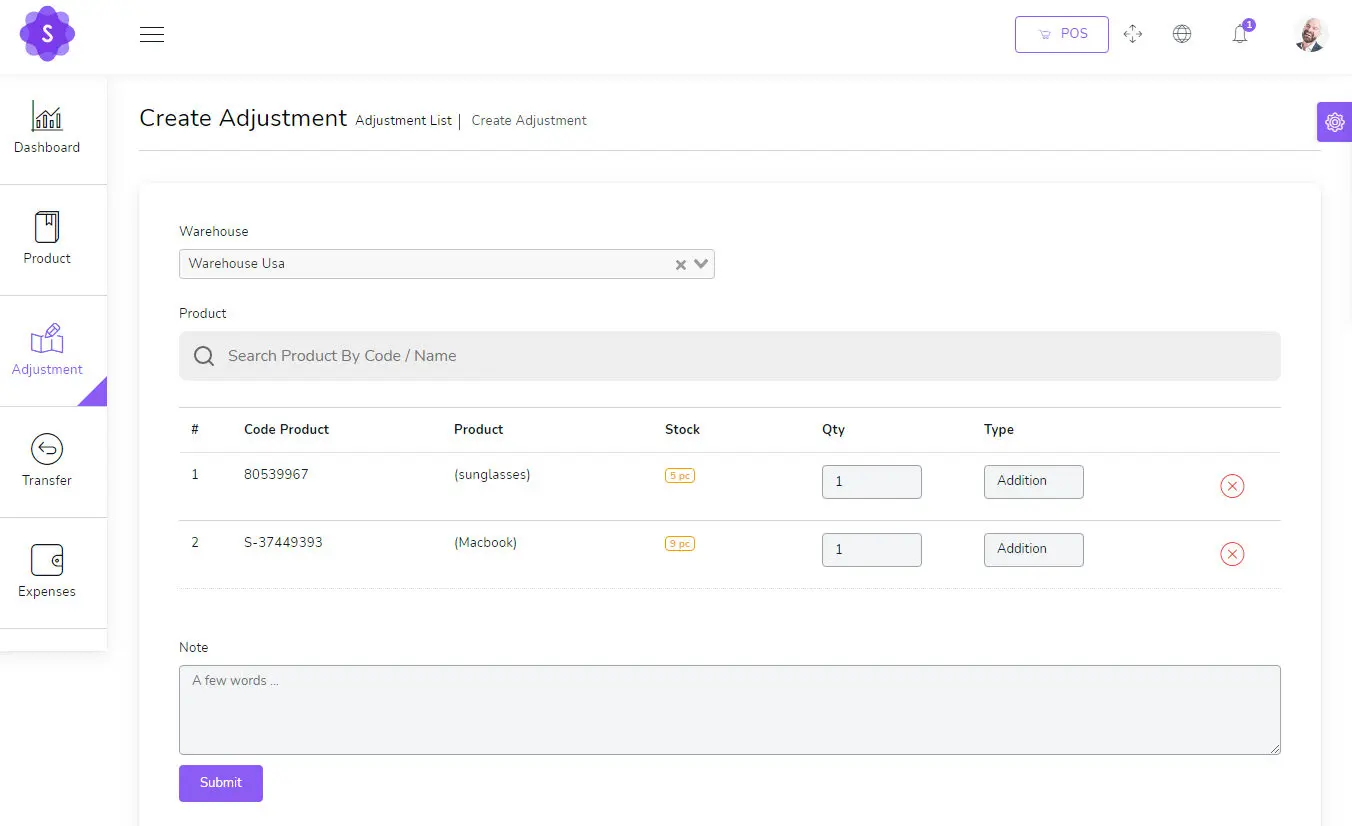
Adjustments
to create a new Adjustment it’s very easy
- Warehouse (required)
- Select Product (required)
Expenses
to create a new Expense it’s very easy
- Date (required)
- Warehouse (required)
- Expense category (required)
- Amount (required)
- Details (optional)

You can manage Expense list
- Edit Expense
- Delete Expense
- Generate Expense list in PDF
- Generate Expense list in Excel
- Filter Expense by Date , Reference , warehouse , Expense category
Quotations
to create a new quotation it’s very easy
- Customer (required)
- Warehouse (required)
- Status (required)
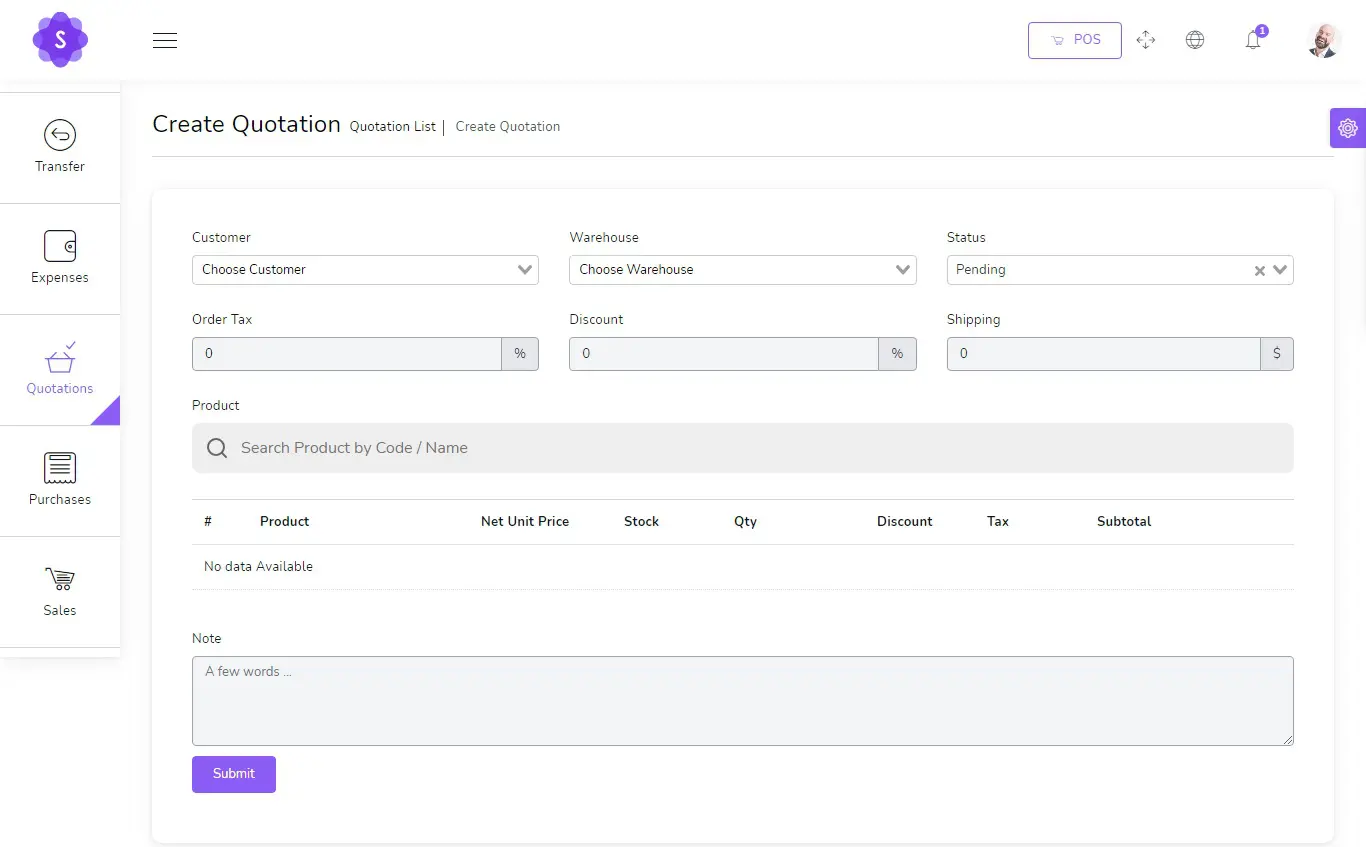
You can manage quotation list
- Edit quotation
- View Details quotation
- Delete quotation
- Change to Sale
- Send quotation on email
- Generate quotation list in PDF
- Generate quotation list in Excel
- Filter quotation by Date, Reference , Customer , Warehouse , Status
Sales
to create a new sale it’s very easy
- Customer (required)
- Warehouse (required)
- Status (required)

You can manage sale list
- Edit sale
- View Details sale
- Delete sale
- Change to Sale
- Send sale on email
- Generate sale list in PDF
- Generate sale list in Excel
- Filter sale by Date, Reference , Customer , Warehouse , Status , Payment status
Sales POS
Easy POS
- Barcode Scanner
- you can search for product by name or code
- Filter Product by Brand , Category

POS Invoice

Purchases
to create a new purchase it’s very easy
- Supplier (required)
- Warehouse (required)
- Status (required)
You can manage purchase list
- Edit purchase
- View Details purchase
- Delete purchaseSend purchase on email
- Generate purchase list in PDF
- Generate purchase list in Excel
- Filter purchase by Date, Reference , Supplier , Warehouse , Status , Payment status
Sale Returns
to create a new Sale Return it’s very easy
- Customer (required)
- Warehouse (required)
- Status (required)
You can manage Sale Return list
- Edit Sale Return
- View Details Sale Return
- Delete Sale Return
- Send Sale Return on email
- Generate Sale Return list in PDF
- Generate Sale Return list in Excel
- Filter Sale Return by Date, Reference , Customer , Warehouse , Status , Payment status
Purchase Returns
to create a new Purchase Return it’s very easy
- Supplier (required)
- Warehouse (required)
- Status (required)
You can manage Purchase Return list
- Edit Purchase Return
- View Details Purchase Return
- Delete Purchase Return
- Send Purchase Return on email
- Generate Purchase Return list in PDF
- Generate Purchase Return list in Excel
- Filter Purchase Return by Date, Reference , Supplier , Warehouse , Status , Payment status
Settings
System Setting
- Edit Currency
- Edit Logo
- Edit Name Company
- Edit Server SMTP
Config SMTP

Go to /app/settings/System_settings and put your config smtp
Host : Host smtp mail server
Port : 25 or 587 or 465 or 2525)
username : your username smtp mail server
password : your password smtp mail server
Encryption : tls or ssl
Complete Online POS Management and Inventory System Project
- Name of Project: Online POS Management and Inventory System Project
- Language: PHP
- Databases used: MySQL
- Design used: HTML JavaScript, Ajax, JQuery, Bootstrap
- Browser used: IE8, Google Chrome, Opera Mozilla
- Software used: WAMP/ XAMPP/ LAMP/MAMP
Demonstration
Login Details as below :
Email : [email protected]
Password : 123456
FOR INSTALLATION WHATSAPP +2348054240542