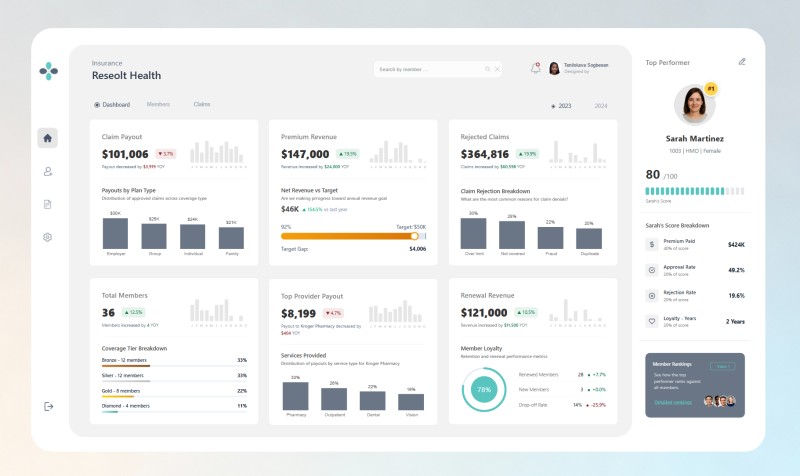
End-to-End Enterprise Member Management System (Power Platform): Architectural Walkthrough

Learn how a fully built end-to-end enterprise-level Member Management System works across the Power Platform using Power BI, Power Apps, Power Automate, and SharePoint. See how stakeholders, operators, and admins interact with dashboards and operational data inside one seamless system.
The dashboard lives in Power BI. A Power App is embedded directly inside the report. And responsibilities are separated through role-based access, so each user only sees and does what they are supposed to.
This is not a build-from-scratch tutorial. Instead, I walk through the architecture, data structure, business logic, automation design, and the reasoning behind each implementation decision.
What the walkthrough covers:
Data Architecture & Governance
- Setting up SharePoint lists as your data foundation
- Connecting SharePoint to Power BI and Power Apps
- Role-based access logic
Power BI + Custom HTML
- Connecting SharePoint lists through Power Query
- Writing custom HTML measures for advanced dashboard styling
- Understanding when to use HTML vs. native Power BI visuals
- Design decisions and best practices
Power Apps Integration
- Embedding Power Apps directly into Power BI
- Form logic and validation strategy
- Structuring multi-case workflows and conditional scenarios
- Real-time activity tracking with SharePoint write-back
Power Automate
- Flow architecture and approval design
- Multi-scenario claim management
- Email and Teams notifications
- Data flow between Power Apps, Automate, and SharePoint
- Automation logic and structural breakdown
Beyond the Tools
Rather than simply showing steps, I explain:
- Why certain architectural choices were made
- How the different Power Platform tools integrate at a system level
- What I would improve if rebuilding it
- The logic behind validation, automation, and workflows
Who This Is For:
- Power BI users looking to understand operational system integration
- Developers exploring Power Apps and Power Automate workflows
- Analysts interested in write-back architecture
- Professionals building enterprise-level solutions
Basic familiarity with Power BI is recommended. Some exposure to Power Apps and Power Automate is helpful but not required.
Want the full system?
Want the Full System:
If you want access to the full project files, including:
- Power BI file
- Power App
- SharePoint data
- Power Automate flows
- Setup guide
👉 Click here to get the full package