End-to-End Enterprise Member Management System (Power Platform): Complete System, Files & Setup Guide

Most Power BI projects stop at the dashboard. This one goes further.
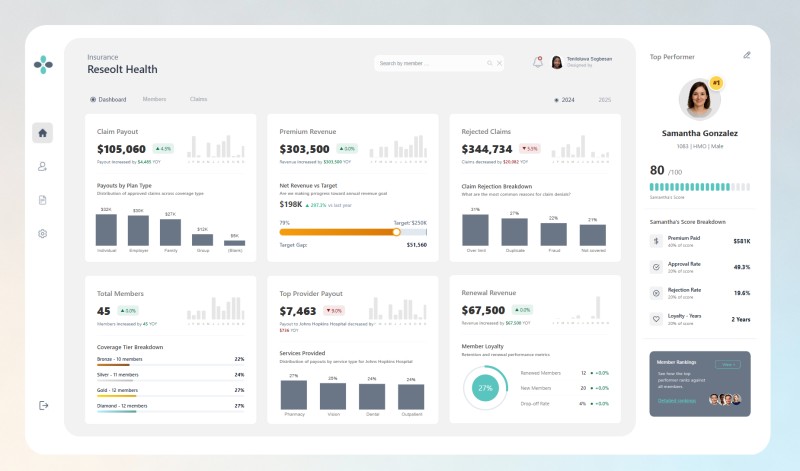
This end-to-end Member Management System demonstrates how Power BI, Power Apps, Power Automate, and SharePoint work together seamlessly in a real enterprise scenario. With this package, you get a fully functional integrated system that shows exactly how these tools can operate as one connected solution, a reference you can study, replicate, or expand for your own projects.
See how stakeholders, operators, and administrators interact with dashboards and operational data in one seamless system.
This is a complete system where:
- The dashboard lives in Power BI
- A Power App is embedded directly inside the report
- Responsibilities are separated through role-based access
What you are getting:
- Power BI report (.pbix) with custom KPI cards built using HTML and SVG inside DAX measures, native visuals, a pop-up member table with pagination, and a top performer card
- Power Apps portal (.zip) with member management features including profile editing, claims management, real-time activity tracking, lapse detection, and data validation
- SharePoint data files (.xlsx) pre-configured and ready to upload
- Step-by-step setup and implementation guide
- Access to the full 1.5-hour system walkthrough video covering the architecture, design decisions, and both Power Automate flows
What the system includes:
A. Member Management
Operators can:
- Search and view member profiles
- Edit records (writes back to SharePoint)
- Track all changes in real time
Every update is logged:
- What changed
- Who changed it
- When it was changed
B. Claims Management
Supports multiple scenarios:
- Approve claims
- Reject claims
- Request more information
Each action triggers a Power Automate approval flow with:
- Email and Teams notifications
- Admin approval process
- Automatic updates back to SharePoint
C. Deletion with Approval Flow
Records cannot be deleted directly.
Instead:
- A deletion request is submitted
- Approval is required
- SharePoint logs the action and admin
D. Role-Based Access
- Power BI users → dashboard only
- Portal users → operational access
- Only authorised users can edit data
E. Dashboard (Power BI)
- High-level insights
- Custom HTML + SVG KPI cards
- Interactive reporting
This is for you if:
- You are a Power Platform developer who wants a real-world reference system to study or build on
- You are preparing a portfolio project for job applications or freelance work
- You are building a similar system for a client and want a head start on the architecture
- You want to understand how Power BI, Power Apps, Power Automate, and SharePoint can work together as one system
Before you buy: This is a portfolio project, not a production-ready solution. Some features are incomplete, including the Add New Member button and the date range filter. The dataset is AI-generated dummy data. Setup requires intermediate knowledge of the Power Platform. The setup guide and walkthrough video will walk you through everything you need.
If you want to watch the walkthrough first before committing to the full package, it is available separately here.
Questions? Reach out at [email protected]