Introducing Selar Bookings: Sell Your Time, Manage Bookings, and Automate Payments — All in One Place
As we continue to make it easier for creators to sell anything, not just digital products, but their time, expertise, and access, we’re introducing a new way to manage and monetise your sessions.
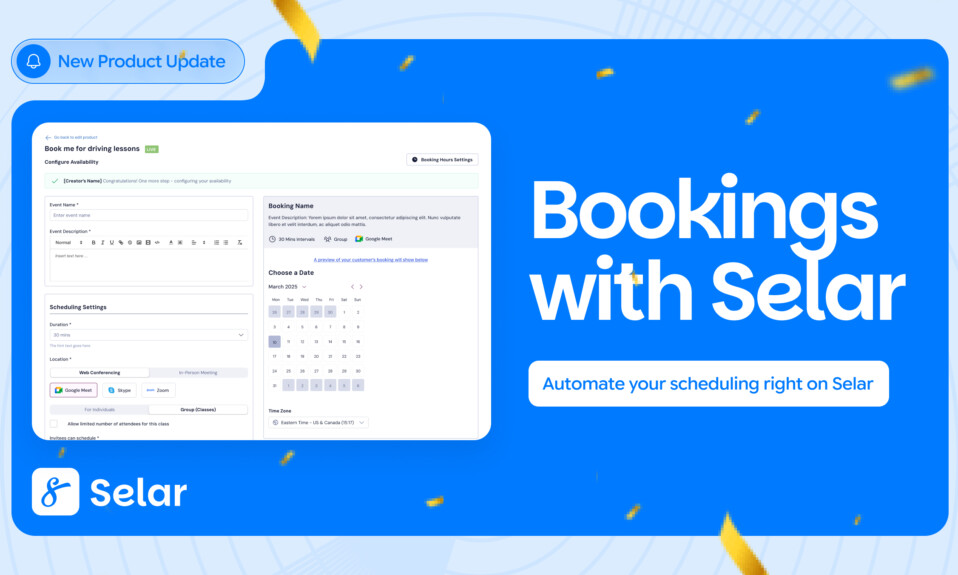
Selar Bookings is a new product type that lets you schedule, sell, and manage sessions from 1-on-1 coaching and consultations to group classes, workshops, and webinars, all in one place.
This process requires no third-party tools, no manual confirmations, and no switching between apps. From calendar setup to payments to automated reminders, everything works together inside your Selar dashboard.
If you’ve been using tools like Calendly for scheduling, WhatsApp for coordination, and separate links for payments, you already know how fragmented the process can be. With Selar Bookings, it’s now one smooth system built for how creators actually work.
It works for:
• 1-on-1 coaching and consultation sessions
• Group classes, workshops, and online training
• Webinar tickets and live events
• Tutoring and skill-based sessions
• Therapy and wellness appointments
• Any service where time is the product
What Selar Bookings Can Do
Here is a full look at what the feature includes:
| Feature | What it does for you |
| Calendar Sync | Connect Google Calendar, Microsoft Calendar (Teams), and Zoom directly from your Integrations page. Syncing is bidirectional, and real-time updates on either side are reflected automatically. So you don’t have double bookings. |
| Custom Availability | You can set your available slots daily, weekly, or monthly. Add buffer times between sessions and lead times before bookings can be made. You control the schedule, and selar enforces it. |
| Group Bookings | If you run a class or workshop, you can set a maximum number of attendees. Once the limit is reached, the slot closes automatically and stops appearing to new customers. Each participant books and pays individually. |
| Intake Forms | You can also collect what you need before the session starts. Attach a custom intake form with goals, health conditions, business background, or any custom question that clients complete before confirming their booking. |
| Automated Reminders | Selar sends confirmation emails immediately after purchase, reminders 1 day before the session, and again 30 minutes before. Both you and the client get notified. You don’t need to do a manual follow-up. |
| Cancellations & Reschedules | If a booking is cancelled or rescheduled, both parties receive an automated email. Cancelled slots reopen for new bookings instantly. |
| Client Management | Access a dedicated Manage Clients page from any product. See every client’s name, email, reference code, and booked date at a glance. Manually add walk-in clients and assign time slots directly from a calendar view. |
| Bookings Dashboard | A dedicated Bookings section in your sidebar shows all upcoming and past sessions with search and date filters. Your full schedule, in one place. |
How to Set Up Selar Bookings
Getting your first booking product live takes less time than a single back-and-forth in your DMs. Here is how it works.
For you, the creator:
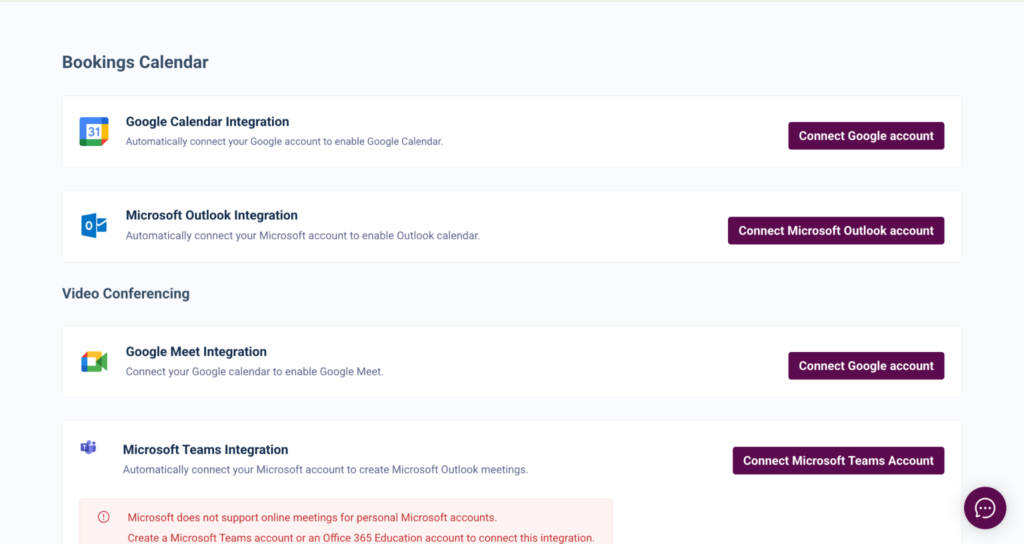
1. Go to the Integrations page in your Selar dashboard and connect Google Calendar, Zoom, and/or Microsoft Calendar.
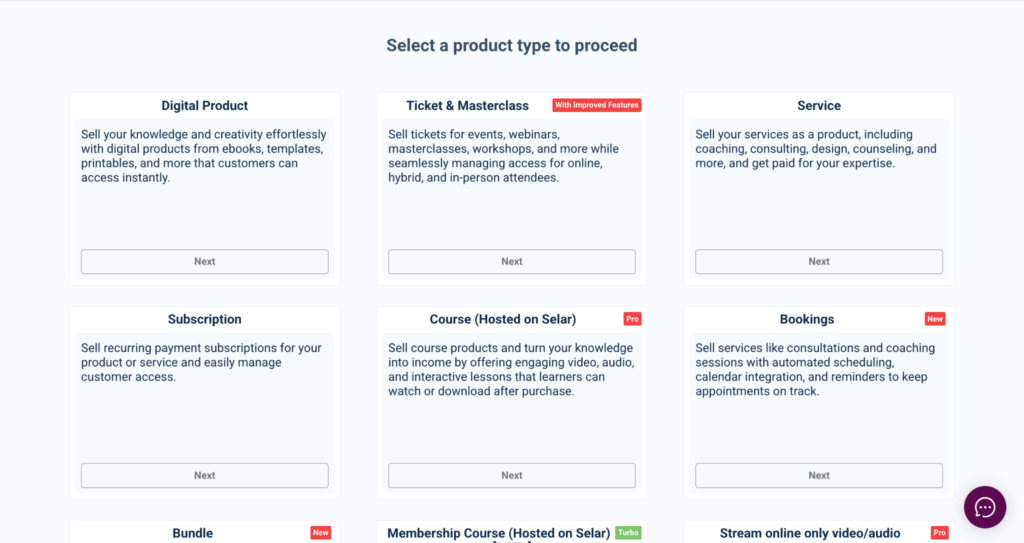
2. Click Add Product and select the Bookings product type (labelled NEW).
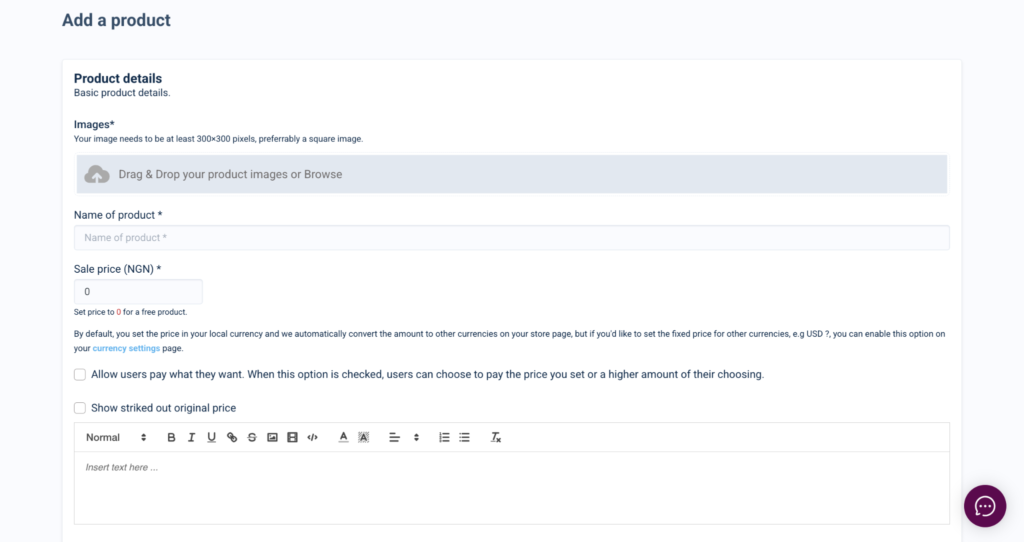
3. Add your title, description, and price for the session.
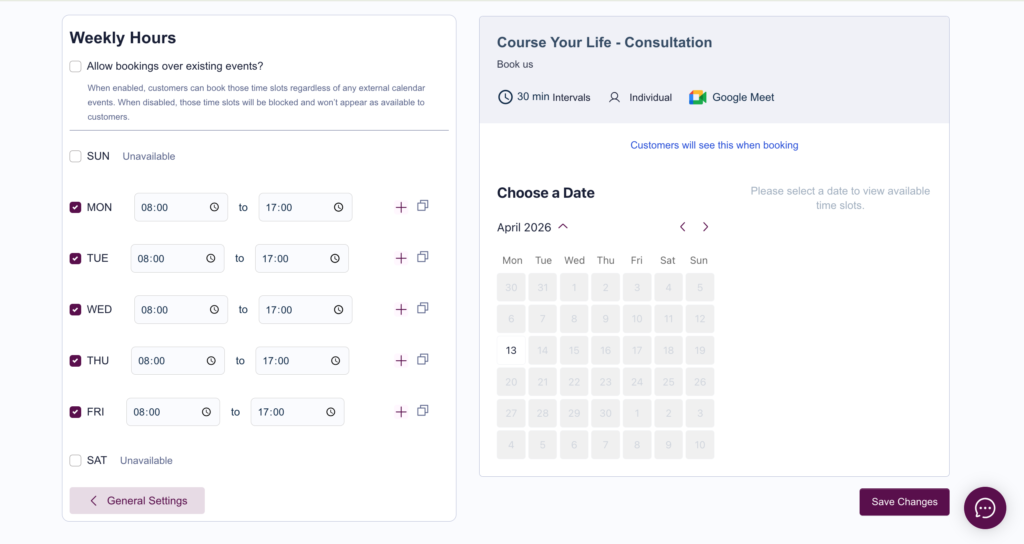
4. Set your available time slots. Configure daily, weekly, or monthly availability, plus buffer times and lead times.
5. Choose your meeting location: Zoom, Google Meet, or a physical address.
6. Optionally enable an intake form and add your custom questions.
7. If offering group sessions, set the maximum attendee limit. Slots close automatically once full.
8. Publish. Manage all bookings from your Bookings dashboard and the Manage Clients page.
For your client:
9. They visit your booking page and click Buy Now.
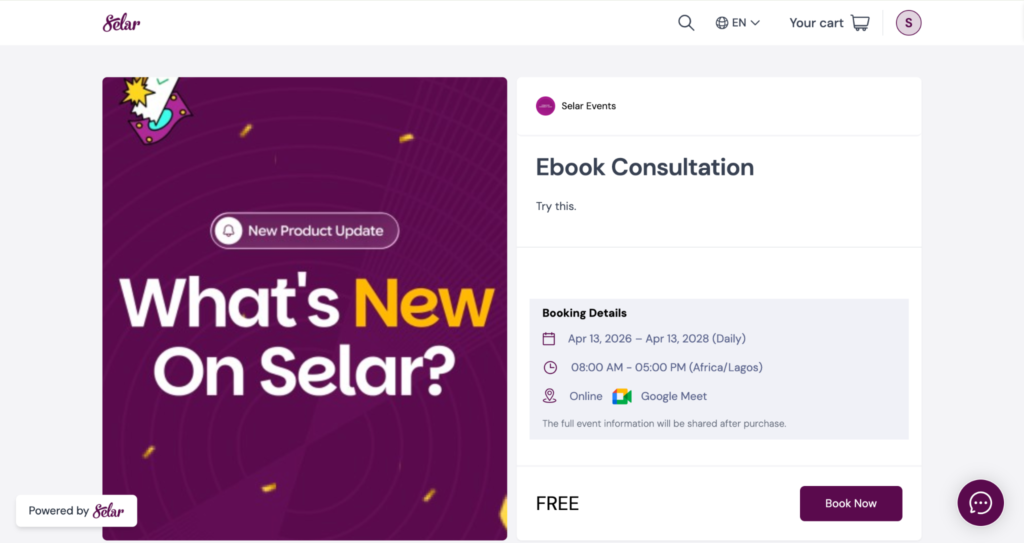
10. A calendar pop-up shows your preset available dates.
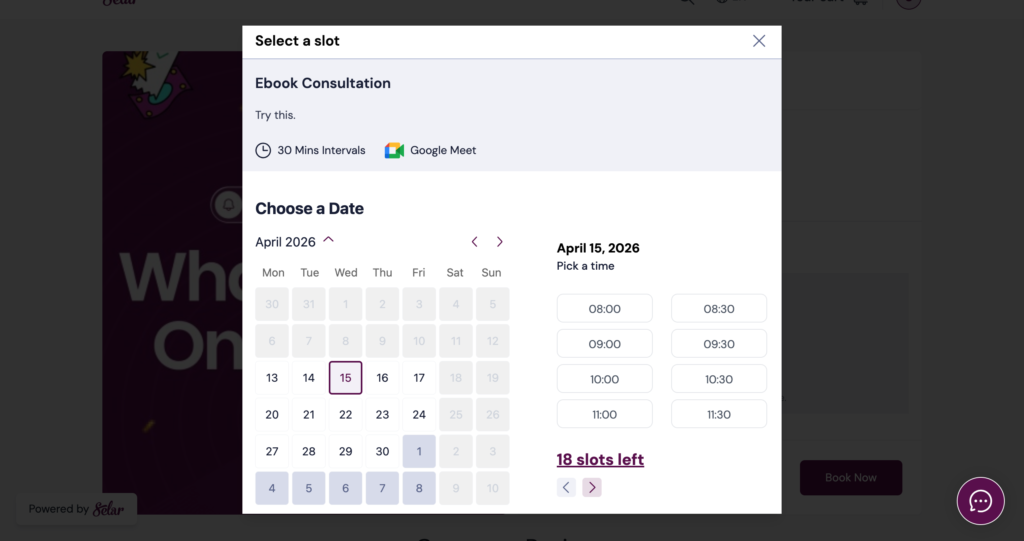
11. They select a date; available time slots for that day appear on the right.
12. They pick a slot. Booked slots are hidden automatically.
13. If intake forms are enabled, they fill these in and proceed.
14. They complete payment on the standard Selar checkout.
15. They land on a receipts page with all booking details, time, venue, and form responses.
16. They receive a confirmation email with options to add the session to their calendar, reschedule, or cancel.
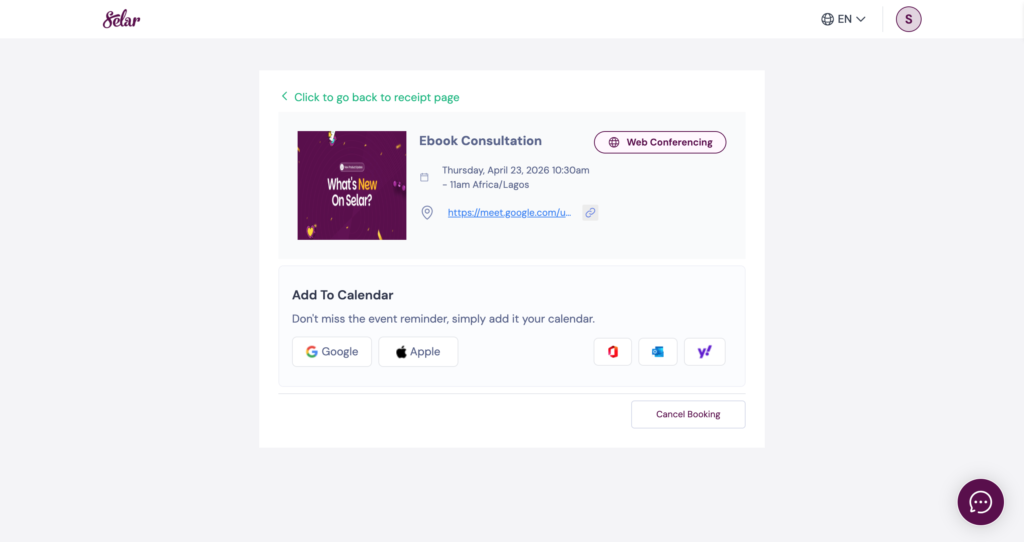
17. They receive automated reminders 1 day and 30 minutes before the session.
For group bookings, clients can also add guests who will receive their own booking notifications.
Who This Is For
Selar Bookings is designed for any creator who sells time-based services. If your income depends on a client showing up at a specific time, this feature is for you.
• Coaches & Consultants:
Stop managing discovery calls and paid sessions across WhatsApp, email, and three different apps. Your entire booking and payment flow now lives in one place.
• Tutors & Educators:
Set recurring slots, cap class sizes, and collect intake information before every session. No spreadsheets, no group chats.
• Event & Workshop Hosts:
Sell tickets to live events with automatic slot limits and built-in urgency; remaining spots are shown to potential buyers at checkout.
• Freelancers & Service Providers:
Take client briefs through intake forms, receive payment upfront, and show up prepared without a single manual step in between.
• Therapists & Wellness Creators:
Manage confidential intake information, set buffer time between sessions, and send automated reminders without relying on a third-party system.
Frequently Asked Questions
Can I sync my existing calendar?
Yes. Google Calendar, Microsoft Calendar (Teams), and Zoom can all be synced from the Integrations page. Syncing is real-time, and bidirectional changes on either side are reflected automatically.
What happens if a client cancels?
Both you and the client receive an automatic cancellation email. The time slot is immediately reopened for new bookings.
Can I run group sessions or classes?
Yes. Set a maximum number of attendees per slot. Each person books individually, and the slot remains visible until it is full. Once the limit is reached, it closes automatically.
Will my clients receive reminders?
Yes. Automated email reminders go out 1 day before and 30 minutes before each session, to both you and the client.
Can I add clients manually?
Yes. From the Manage Clients page, you can manually add a client by entering their name, email, and phone number, then assign a time slot directly from a calendar view.
Can I collect information before a session?
Yes. Intake forms are optional and fully customizable. Clients must complete the form before confirming their booking. This is especially useful for coaches, therapists, or tutors who need context before a session.
What meeting locations are supported?
Creators can set Zoom, Google Meet, or a physical location. If Zoom or Google Meet is not yet connected, the platform will prompt you to integrate them with a direct link to the Integrations page.
Where do I manage my bookings?
All upcoming and past bookings live in the Bookings section on your sidebar and on the Manage Clients page inside each product. Both views include search and date filters.
Already selling digital products on Selar? Selar Bookings is available now as a new product type in your dashboard. Look for it tagged NEW when you click Add Product.